Showing posts with label code. Show all posts

Wednesday, 6 March 2024

A New Test For The Brave Browser and New Security Focused Browsers

How Can We Test For Brave?

By Strictly-Software

I use the Brave browser as well as a few other Chromium-based security-focused browsers such as (Opera, CCleaner, and DuckDuckGo) most of the time due to their inbuilt security measures. My preferred browser is Brave due not only to its Shield which removes trackers, cookies, adverts, and has a measure of built-in fingerprint spoofing. Plus it has its own search engine, which can be accessed from the address bar, and it doesn't block certain sites like Google and other search engines do.

It also blocks Google's Accelerated Mobile Pages and takes you to the original publisher's site, can have strict upgrades to HTTPS URLs when linked to an unsecured domain, as well as its incognito pages are based on the TOR engine.

I never use Chrome anymore as it used to be a quick plain browser but has now got bogged down with too many options. Also, I don't like Google which relies on heavy use of adverts and selling user information for revenue, plus its other links to intelligence agencies, and its censorship. This has pushed mainstream media articles ahead of legitimately more relevant sites. I also don't like it's use of banned reading lists that try to prevent people from viewing sites the US Intel Establishment has deemed unsuitable like RT.com or Infowars.com

Plus I don't know what they now do server side to try and identify users due to all these new privacy-based browsers, and the number of privacy plugins/extensions, that could help protect you. However, it's good to know you can have a measure of protection without bogging the browser down with plugins such as fingerprint spoofers like Trace and AdBlockers like MalwareBytes or the DuckDuckGo plugin. Also, I like being able to earn cryptocurrency from Brave which rewards the user, not the site for viewing small adverts.

However, the issue with Brave is that it hides as Chrome and doesn't have its own user agent. It used to, and the hope is that in the future it will again but at the moment it just shows a Chrome user-agent. 

For example, my latest Brave user-agent is:

Mozilla/5.0 (Windows NT 10.0; Win64; x64) AppleWebKit/537.36 (KHTML, like Gecko) Chrome/122.0.0.0 Safari/537.36

There have also been a lot of changes to how Brave identified itself in the Window and Navigator sub-object that used to make Brave identifiable through inspection of certain objects. These seem to have changed back and forth many times and you can see some of the old objects that used to be checked in my older article on looking for Brave here.

Why bother looking for Brave, or indeed any browser when feature detection should be used rather than user-agent sniffing or other means to find the name of the Browser?

Well, Brave prides itself on security, hiding adverts, removing tracking code and cookies, and now has a certain level of fingerprint sniffing protection to stop sites from using properties identified by JavaScript or Server Side code to change Response headers to make identifying unique users and traffic to sites much harder.

Therefore you may want to write Chromium extensions that add extra protection to Brave browsers or do the reverse, add code back in to replace removed adverts, or help track link clicks with removed Ping attributes or other devious plans your boss wants you to run on sites accessed by people using Brave. 

I don't know, I just like to play with the code and see what object detection features each browser reveals. They may all be based on Chromium but they can all have unique features.

An updated function from my previous article makes use of the fact that Brave now identifies itself in the window.navigator object, specifically the brave object in navigator and the isBrave property within that. 

First I rule out any Mozilla browsers e.g Firefox by looking for a well-known Mozilla property, and ensure the browser is Chromium based by checking for a Webkit property. It is similar to the two line old function but uses a new Webkit property as the old one has been removed and is wrapped in a function.

function IsBrave(){
	
	let w=window,n=w.navigator; // shorten key objects

	// as many tests we know browsers now support; prove its not Mozilla; prove its Chromium based and has Brave properties in window and navigator objects
	let isBrave = !("mozInnerScreenX" in w) && ("chrome" in w && "onwebkitanimationiteration" in w && "brave" in n && "isBrave" in n.brave) ? true : false;
	
	return isBrave;
}

And if you want to check for the new CCleaner browser there isn't any specific objects in the navigator object I can see but it does have a unique user-agent e.g:

Mozilla/5.0 (Windows NT 10.0; Win64; x64) AppleWebKit/537.36 (KHTML, like Gecko) Chrome/121.0.0.0 Safari/537.36 CCleaner/121.0.0.0

However, the Duckduckgo browser, which comes with an email protection service, allowing you to use a specific @duck.com email address that only forwards non-spam emails to your real address, does have a specific object if you want to check for it.

// detect duckduckgo
let duckduckgo = ("duckduckgo" in navigator) ? true : false;
However, we all should be detecting objects to allow for features rather than the old method of user-agent sniffing, but if you did want to identify certain browsers there are unique objects, usually on the navigator object that can be checked.

You should know that there are lots of ways you can protect yourself from tracking and unique identification nowadays but it does rely on the device you are using to browse as well as the model of that device.

For instance, even if you are now using IPv6 addresses on your router which makes unique identification a lot easier than the older DCHP method of picking a free IPv4 address as local to you as possible when accessing the web, your system can be set to use temporary IPv6 addresses.

This means that your real unique identifying IP address is never shown to outside sites. A look at ipconfig /all in your command prompt will show you whether you are using them or not and a search online will show you how to change the settings if you're not using them yet.

Also, if you are using Android or iOS phones or devices that use Google as an integral part of their system, you can delete the unique advertising ID that exists to allow sites to uniquely track you whether or not your browser or plugin removes Google tracking codes. 

On iOS the ad identifier is also called "IDFA" and on Android, "AAID". As these IDs can only be accessed using server-side code, Java or Python, and a Google library, modifying the DOM won't stop you from being tracked. 

You can easily remove these IDs in the Privacy / Advertising section of your phone's settings if you have Android 12 or above. iOS devices are more complicated but this article explains how to remove them.

If you want to check what properties exist for a browser object then these two lines of code can help you out rather than a loop.
const keys = Object.keys(window);
console.log(keys);

This just outputs all the keys such as events, other objects like document and navigator, and properties as well into the developer tools console area that all modern browsers have.

Remember as Brave, CCleaner, DuckDuckgo, Edge, Opera and Chrome are all based on the same Chromium browser they are the same standard-compliant browsers. However, as I stated in my last article, it is amazing how many modern sites still break when I use a user-agent switcher and change my string to IE6 for example. 

They really shouldn't if they were using feature detection by checking for the existence of objects before running certain code.

By Strictly-Software

Sunday, 30 October 2022

What do you do when you have multiple blogs under one Google Blogger Account?

Changing The Names Of Replies And Posts

By Strictly-Software

If you are a blogger user and you have multiple blogs each with different names then you might run into the problem that when you post, or reply to a message using your Google account it will put your main Blogger account name in as the author, or comment author.

Now the way I have got round this is to use JavaScript in the footer of the blog. Add a JavaScript / HTML gadget to the footer of your blog and then you can fix this issue.

I will show you two ways you can fix this using old JavaScript and newer JavaScript .

To fix the name of post authors you can use this code. Say your blogger author name is Dave Williams but you are using pseudo names for your blog, say "Strictly-Software" for example then you don't want Dave Williams posted at the end of each post, you want Strictly-Software to appear.

Wrap these in SCRIPT blocks, whether a short <script>....</script> block or a full old style <script type="text/javascript"><!-- ..... //--></script> tags. Up to you.

This looks for all the spans with a class of "fn" which appears under the post where it says "Posted by ..... at 9:58pm" etc. So we loop through all the fn classes and change the innerHTML to the value we want.
 
(function(){
var x = document.getElementsByClassName("fn");
var i;
for (i = 0; i < x.length; i++) {
    x[i].innerHTML = "Strictly-Software";
}
})()

Now what about comments? 

If you are replying to someone and you don't want to use the Name/URL option to put your blogs name in, then you can use the Google option so it knows you own the comment, but then you can use some code to identify the links which contain the Google Authors name and if found update them to the name you want.

Same as before with the SCRIPT tags, although I put both together one after the other in one script block at the bottom of my layout.

Now, this code uses a more modern document.querySelectorAll method to find all elements that match the selector we pass in which will be an anchor tag. This is because all comments have the name of the person commenting wrapped in a comment tag IF you use a Google Account to post it. 

Obviously, Anonymous and Name/URL comments can't as there is nowhere to link to.

(function(){
	var x = document.querySelectorAll("a");
	var i;
	for (i = 0; i < x.length; i++) {		
		if(x[i].innerHTML=="Dave Williams"){
			x[i].innerHTML="Strictly-Software"
		}		
	}
})();

As you can see I am looping through all the elements that the querySelectorAll("a"); returns. 

If we had used just querySelector it would have only found the first A tag on the page and we need to find and replace all comments on the page which have Dave Williams as the current contents and if found, we replace it with Strictly-Software by using the innerHTML of the element.

I just thought I would post this as I had to do this tonight on one of my other blogs as I noticed the comment author was wrong. You could use the 2nd method for getting the author name as well if you wanted but I thought I would show you two ways of doing this.

Hope this helps if you have the same issue.

By Strictly-Software

Thursday, 11 August 2022

Testing For Internet Connectivity

Setup Measures For A Big API System

By Strictly-Software

I have a BOT that runs nightly, and in the SetUp() methods to ensure everything is okay, it runs a number of tests before logging to an API table in my database. This is so I know if the API I am using is available, whether I needed to login to it, when the last job was started and stopped, and when the last time I did log into the API. 

It just helps in the backend to see if there are any issues with the API without debugging it. Therefore the SetUp job has to be quite comprehensive.

The things I need to find out, which are logged into the logfile.log I keep building until the job is finished with major Method Input Params, Return Params, Handled Errors, Changed System Behaviour, SQL Statements that return an error e.g timeout, an unexpected divide by zero error and the like are the following from my SetUp job.

1. Whether I can access the Internet, this is done with a test to a page that just returns an IPv4 or IPv6 address. The major HTTP Status code I look for there is a 200 status code. If I get nowhere but get a status code of 1 that is a WebExceptionStatus.NameResolutionFailure, which means the DNS could not find the location and it's probably due to either your WIFI button being turned off (Flight Mode), or your Network Adapter having issues.

I test for web access with an obvious simple HTTP test to an IP page that returns my address, with 2 simple regular expressions that can ID if it's IPv4 or IPv6.


public string TestIPAddress(bool ipv4=true)
{
    string IPAddress = "";
    // if we are using an IPv6 address the normal page will return it if we want to force
    // get an IPV4 address then we go to the IPv4 page which is the default behaviour due to
    // VPNS and Proxies using IPV4 usually
    string remotePageURL = ((ipv4) ? "https://ipv4.icanhazip.com/" : "https://icanhazip.com/");
   
    this.UserAgent = this.BrainiacUserAgent; // use our BOT UserAgent as no need to spoof
    this.Referer = "LOCALHOST"; // use our localhost as we are running from our PC
    this.StoreResponse = true; // store the reponse from the page
    this.Timeout = (30000); // ms 30 seconds            

    // a simple BOT that just does a GET request I am sure you can find a C# BOT example on my blog or tons on the web
    this.MakeHTTPRequest(remotePageURL);            

    // if status code is between 200 & 300 we should have data
    if (this.StatusCode >= 200 && this.StatusCode < 300)
    {
		IPAddress = this.ResponseContent; // get the IP Address

		// quick test for IPAddress Match, IPv4 have 3 dots
		if(IPAddress.CountChars('.')==3)
		{
		   // An IpV4 address can replace dots and if all numbers then it is IPv4
		   string ip2 = IPAddress.Replace(".", "");
		   if(Regex.IsMatch(ip2, @"^\d+$"))
		   {
				this.HelperLib.LogMsg("IP Address is IPv4: " + IPAddress + ";","MEDIUM"); // log to log file
		   }
		}
		// otherwise if it contains : semi colons (and nos and certain HEX letters)
		else if (IPAddress.Contains(':'))
		{
		   // could be an IpV6 address check only numbers and letters when colons are removed                    
		   if (Regex.IsMatch(IPAddress, @"^[:0-9A-F]+$"))
		   {
				this.HelperLib.LogMsg("IP Address is IPv6: " + IPAddress + ";","MEDIUM"); // log to log file
		   }
		}
    }
    else
    {
		// no response, flight mode button enabled?
		this.HelperLib.LogMsg("We could not access the Internet URL: " + remotePageURL + "; Maybe Flight Mode is on or Adapter is broken and needs a refresh", "LOW");

		IPAddress = "No IP Address returned; HTTP Errror: " + this.StatusCode.ToString() + "; " + this.StatusDesc + ";";

		// call my IsNetworkOn function to test we have a network
		if(this.IsNetworkOn())
		{
		   this.LastErrorMessage = "The Internet Network Is On but we cannot access the Internet";
		}
		else
		{
		   this.LastErrorMessage = "The Internet Network Is Off and we cannot access the Internet";
		}

		this.HelperLib.LogMsg(this.LastErrorMessage,"LOW"); // log error

		// throw the error will be caught in a lower method and stop the script
		throw new System.Exception(this.LastErrorMessage);
    }
}


If that fails then I run this method to see if the Network is available. You can see in the code above that I call it if there is no 200-300 HTTP status response or IP address returned. 

I test it by running the console script with and without the flight mode button on my laptop.

public bool IsNetworkOn()
{
bool IsNetworkOn = System.Net.NetworkInformation;

NetworkInterface.GetIsNetworkAvailable();

return IsNetworkOn;
}
I also have a series of Proxy addresses I can use to get round blocks on IP addresses although I do try and use Karmic Scraping e.g no hammering of the site, caching pages I need to prevent re-getting them, gaps between retries if there is a temporary error where I change the referer, user-agent and proxy (if required), before trying again after so many seconds.

Also before I turn on a global setting in my HelperLib class which is the main class all other objects refer to and pass from one to another, I test to see if the computer I am on is using a global proxy or not. I do an HTTP request to a page that returns ISP info, and I have a list of ISP's which I can check

If my ISP comes back with the right ISP for my home, I know I am not on a global proxy, also it tells me whether the IP address from earlier is IPv4 or IPv6, then I know I am not using a global proxy. If Sky or Virgin is returned I know I have my VPN enabled on my laptop and that I am using a global proxy.

If I am using a global proxy all the tests and checks for "getting a new random proxy:port" when doing an HTTP request are canceled as I don't need to go through a VPN and then a proxy. If the Global Proxy is turned off I might choose to get a random proxy before each HTTP call. 

If that setting is enabled in my Settings class. As you can't have config page in console scripts that hook into a DLL, my code in the DLL for my settings is just a class called Settings with a big Switch Statement where I get the setting I need or set it.

Once I have checked my Internet access I then do an HTTP call to the Betfair API Operational page which tells me if the API is working or not. If it isn't then I cannot log in into it. If it is working I do a Login test to ensure I can login this involves:
  • Using 1 of 2 JSON methods to login to the 2 endpoints that give me API access with a hashed API code, and my username & password.
  • If I can log in, I update the API table in the DB with the time I logged in and that I am logged in. There may be times I don't need to login to the API such as when I am just scraping all the Races and Runner info.
  • I then do a Session re-get, I hold my session in a file so I don't have to re-get a new one each time but on a run I like to get a new Session and extract the session code from the JSON return to pass back in JSON calls to get data etc.
  • I then do a database test using my default connection string I just SELECT TOP(1) FROM SYS.OBJECTS and ensure I get a response.

Once I know the API is operational, the DB connectivity is working and that I can scrape pages outside the Betfair API I can set all the properties such as whether to use a random proxy/referer/user-agent if one of my calls errors (with a 5 second wait), if I am using a global proxy I don't bother with the proxies.

Believe it or not that is a lot of code across 5 classes just to ensure everything is okay on running the job from the console or Windows Service

I throw my own errors if I cannot HTTP scrape, not just log them, so I can see what needs fixing quickly, and I create a little report with the Time, BOT version, Whether it is live, testing, placing real bets, running from a service or console and other important info I might need to read quickly.

So this is just a quick article on how I go about ensuring a project using a big DLL (with all the HTTP, HelperLib, API etc) code is working when I run it.

Who knows you might want to do similar checks on your large automated systems. 

Who knows. I am just making bank from my AutoBOT which TRADES on Betfair for me!

© 2022 Strictly-Software

Wednesday, 3 August 2022

Extending Try/Catch To Handle Custom Exceptions - Part 2

Extending Core C# Object Try/Catch To Display Custom Regular Expression Exceptions - Part 2

By Strictly-Software

This is the second part of our custom Try/Catch overwrite program that is aimed to catch Regular Expression errors that would normally be thrown up by !IsMatch (doesn't match) and so on.
 
So why would you want to do this when the C# .NET RegEx functions already return a true or false or 0 matches etc which you could use for error detection?
 
Well, you can read the first article above this one for info however you may have a case where you have a BOT that is automatically running every day all day on certain sites where the HTML has been worked out and expression especially made to match them. 

If for example the HTML source changes and the piece of data you are collecting suddenly does not get returned anymore as your expression does not match anything instead of just logging to a file which means scanning and checking for errors once you notice your fully automated 24/7/365 system has stopped working 2 months later. 

Therefore instead of just logging the results of IsMatch you may want to throw up an error and stop the program so that a new expression can be made to match the HTML ASAP without lots of data being missed.
 
If you want more info on the Try/Catch class, read the first example article. Here we build just a basic BOT that is going to utilise the RegExException class we made last time. It is not a perfect BOT, you may get some warnings come up, I did it in VS 2021, and it's a specific BOT as its aims are to get the META Title, Description, and the full source of the URL that is passed into it. 

Any errors with the regular expressions not matching anymore are thrown up using our RegExException TryCatch cobject so that they detail the expression, text, or whichever of the 3 methods we made. If you want to use it as the basis of your own BOT you can but has been specifically designed to demonstrate this RegEx TryCatch example so you may want to edit or remove a lot of content first before building back on top of it if you want to make your own BOT in C#.
 
So here is the BOT

public class HTML
{
	public string URL  // property
	{ get; set; }

	public string HTMLSource  
	{ get; set; }

	public string HTMLTitle
	{ get; set; }

	public string HTMLDesc
	{ get; set; }

	public void GetHTML()
	{
	    string HTMLSource = "";
	    string HTMLTitle = "";
	    string HTMLDesc = "";

	    // if no URL then all properties are blank
	    if (String.IsNullOrWhiteSpace(this.URL))
	    {
			HTMLTitle=HTMLDesc = HTMLSource = "";
			return;
	    }

	    try
	    {
			HttpWebRequest request = (HttpWebRequest)WebRequest.Create(this.URL);
			HttpWebResponse response = (HttpWebResponse)request.GetResponse();

			if(response.StatusCode == HttpStatusCode.Forbidden)
			{
		    	throw new Exception(String.Format("We are not allowed to visit this URL {0} 403 - Forbidden", this.URL));
			}
			else if(response.StatusCode == HttpStatusCode.NotFound)
			{
		    	throw new Exception(String.Format("This URL cannot be found {0} 404 - Not Found", this.URL));
			}
            // 200 = OK, we have a response to analyse
            else if (response.StatusCode == HttpStatusCode.OK)
            {
                Stream receiveStream = response.GetResponseStream();
                StreamReader readStream = null;
                if (response.CharacterSet == null)
                {
                    readStream = new StreamReader(receiveStream);
                }
                else
                {
                    readStream = new StreamReader(receiveStream, Encoding.GetEncoding(response.CharacterSet));
                }

                string source = this.HTMLSource = readStream.ReadToEnd();

                if (!String.IsNullOrWhiteSpace(source))
                {
                    // extract title with a simple regex                        
                    string reTitle = @"^[\S\s]+?<title>([\S\s]+?)</title>[\S\s]+$";
                    // Get the match for META TITLE if we can using a wrapper method that takes a regex string, source string and group to return
                    string retval = this.GetMatch(reTitle, source, 1);
                    if (!String.IsNullOrWhiteSpace(retval))
                    {
                        this.HTMLTitle = retval;
                    }
                    else // failed to find the <title>Page Title</title> in the HTML source so throw a Regex Exception
                    {
                        throw new RegExException(reTitle, new Exception(String.Format("No match could be found for META Title with {0}", reTitle)));
                    }

                    // META DESCRIPTION
                    string reDesc = @"^[\s\S]+?<meta content=[""']([^>]+?)['""]\s*?name='description'\s*?\/>[\s\S]*$";
                    // Get the match for META DESC if we can using a wrapper method that takes a regex string, source string and group to return
                    retval = this.GetMatch(reDesc, source, 1);
                    if(!String.IsNullOrWhiteSpace(retval))
                    {
                        this.HTMLDesc = retval;
                    }
                    else // failed to find the <title>Page Title</title> in the HTML source so throw a Regex Exception
                    {
                      throw new RegExException(reDesc, new Exception(String.Format("No match could be found for META Description with {0}", reDesc)));
                    }
                }

                response.Close();
                readStream.Close();
            }
	    }
	    catch(WebException ex)
	    {
          	// handle 2 possible errors
          	if(ex.Status==WebExceptionStatus.ProtocolError)
          	{
              Console.WriteLine("Could not access {0} due to a protocol error", this.URL);
          	}
          	else if(ex.Status==WebExceptionStatus.NameResolutionFailure)
          	{
              Console.WriteLine("Could not access {0} due to a bad domain error", this.URL);
          	}
	    } // catch anything we haven't handled and throw so we can code in a way to handle it
	    catch (Exception ex)
	    {
			throw;
	    }
	}


	private string GetMatch(string re,string source,int group)
	{
	    string ret = "";

	    // sanity test
	    if (String.IsNullOrWhiteSpace(re) || String.IsNullOrWhiteSpace(source) || group == 0)
	    {
			return "";
	    }
	    // use common flags these could be passed in to method if need be
	    Regex regex = new Regex(re, RegexOptions.IgnoreCase | RegexOptions.Compiled | RegexOptions.Multiline);

	    if (regex.IsMatch(source))
	    {
          	MatchCollection matches = regex.Matches(source);

          	Console.WriteLine(String.Format("We have {0} matches", matches.Count.ToString()));

		foreach (Match r in matches)
		{
		    if (r.Groups[group].Success)
		    {
				ret = r.Groups[group].Value.ToString().Trim();
				break;
		    }
		}                
	    }
	    // return matched value
	    return ret;
	}
}
 
So as you can see this HTML Class is my basic BOT. It has 4 properties, URL (which is just to set the URL of the code to get) then: HTMLSource, HTMLTitle, and HTMLDesc which as you can see are all abbreviations of the 3 main bits of the content we want from our BOT, the META Title, META Description, and the whole HTML source. We set these using the code in our HTML classes GetHTML() which does the main work but uses another method GetMatch() to try and get the match of the parameters passed in e.g the expression, the source code to get any match from, and the no of the match to get.
 
For example, there may be bad XHTML/HTML all over the web where people have used ID"s multiple times or put elements that should only exist once in multiple times. With this last parameter, you can ensure you are getting the match you want, usually 1 for the first.
 
Hopefully, you can see what the class is doing and how the results of the IsMatch method can fire off a custom RegExException or not and how it is formatted.
 
In the next article, we will show the content that uses this class to return data and put it all together
 
 
© 2022 By Strictly-Software 

Thursday, 3 February 2022

Testing For The Brave Browser

How Can We Test For Brave?


By Strictly-Software

The problem with detecting the Brave browser which I use most of the time is that it hides as Chrome and doesn't have its own user agent. It used to, and the hope is that in the future it will again but at the moment it just shows a Chrome user-agent. 

For example, my latest Brave user-agent is:

Mozilla/5.0 (Windows NT 10.0; Win64; x64) AppleWebKit/537.36 (KHTML, like Gecko) Chrome/97.0.4692.99 Safari/537.36

It also apparently used to have a property on the windows object window.Brave which is no longer there anymore. I have read many articles on StackOverflow about detecting Brave and all the various methods that apparently used to work don't anymore due to objects and properties such as window.google and window.googletag no longer exists on the windows object.

As these posts were not written that long ago it seems that there have been a lot of changes on the window object by Chrome / Google / Brave etc. So when writing your own function as I did it is worth outputting all the keys on the window object first to see what is there and what isn't e.g.

const keys = Object.keys(window);
console.log(keys);

This just outputs all the keys such as events, other objects like document and navigator, and properties as well into the developer tools console area that all modern browsers have.

As Brave, Edge, Opera and Chrome are all based on the same Chromium browser they are basically the same standard-compliant browsers.

Remember we should always use feature detection rather than user-agent parsing to choose whether or not to do something in JavaScript but it is amazing when using a user-agent switcher how many modern-day sites break when I change a standards-compliant browsers agent string to IE 6 for example.

If the coder wrote their code properly it wouldn't matter if I changed the latest version of Chromes user-agent to IE 6 or even IE 4 or Netscape Navigator 4, all sites should work perfectly as instead of doing old school tests like

isIe = document.all;
isNet = document.layers;

And then branching off those two as we did in the old days of scripting which led to browsers like Opera which no one catered for, having to support both IE and Netscape event handlers and pretending to not exist. However, they did eventually add the Opera property to the window object so if you really wanted to find it you could just test for:

if(window.opera){
  alert("This is Opera");
}

However, this no longer exists and Opera uses the same WebKit Chromium base as all the other modern browsers apart from Firefox.

Also, remember that the issue with JavaScript is that every object can be overwritten or modified, that is why we have user-agent switchers in the first place because they can, and do overwrite and change the window.navigator object.

Therefore if you are really pedantic there is NO real way to test if anything is real in JavaScript as a plugin or injected script could have added properties to the Window object such as changing the user-agent or adding a property another browser uses to the window so that tests for window.chrome fail in FireFox because you have created a window.chrome property FireFox detects.

There are loads of ifs and buts and we can discuss the best approach all day due to injected code and extensions overwriting objects or accidental setting of objects by forgetting to do == and accidentally setting a variable or object with a single = by mistake, but let's answer the question,

I have read a lot about people trying to detect Brave and a lot of old objects on the Chrome browser like window.google and window.googletag that no longer exist or even window.Brave which apparently existed on the window object at one stage. 

Why might you want to even detect Brave if it is a standards-compliant Browser and you are doing feature detection and not user-agent sniffing anyway you might ask? 

Well good question, if you are writing your code properly you shouldn't ever need to know what Browser the code is running in as it will work whatever the user is running your web page in due to proper use of feature detection. 

However, you may have a site that wants to direct people to the right extension depository or download the correct add-on. Therefore to make the user comfortable in their decision you might want to show that you know what browser the user has so that they are happy downloading the add-on. 

Or there might be a myriad of other reasons such as asking users to update their browser due to an exploit that has been discovered or to ask old people still using IE6 to upgrade to a modern browser. Also if you want them to use one that removes cookies, trackers, and adverts, and is security conscious, you may want to direct non-Brave users to the Brave download page.

Therefore the function I have come up with tries to future proof by hoping Brave does put its name into the user-agent at some point, and it checks for the existence of properties in objects such as the window or navigator object.

You can put all your complaints and ideas for improving this function for detecting Brave in the comments section and maybe we can come up with a better solution.

// pass or don't pass in a user-agent if none is passed in it will get the current navigator agent
function IsBrave(ua){
	
	var isBrave = false;
	ua = (ua === null || ua === undefined) ? ua = window.navigator.userAgent : ua;

	ua = ua.toLowerCase();

	// make sure it's not Mozilla
	if("mozInnerScreenX" in window){		
		return isBrave;
	}else{
		// everything in JavaScript is over writable we could do this to pass the next test 
		// but then where would we stop as every object even window/navigator can be overwritten or changed...?
		// window.chrome="mozilla";
		// window.webkitStorageInfo = "mozilla";

		// make sure its chrome and webkit
		if("chrome" in window && "webkitStorageInfo" in window){
			// it looks like Chrome and has webkit
			if("brave" in navigator && "isBrave" in navigator.brave){
				isBrave = true;
			// test for Brave another way the way the framwwork Prototype checks for it
			}else if(Object.prototype.toString.call(navigator.brave) == '[object Brave]'){
				isBrave = true;			
			// have they put brave back in window object like they used to
			}else if("Brave" in window){
				isBrave = true;			
			// hope one day they put brave into the user-agent
			}else if(ua.indexOf("brave") > -1){
				isBrave = true;
			// make sure there is no mention of Opera or Edge in UA
			}else if(/chrome|crios/.test(ua) && /edge?|opera|opr\//.test(ua) && !navigator.brave){
				isBrave = false;			
			}
		}

		return isBrave;
	}
}

Of course if you really didn't want all these fallback tests and hope that Brave will sort their own user-agent out in the future or re-add a property to the window object as they apparently used to then you could just do something like this:
var w=window,n=w.navigator; // shorten key objects
let isBrave = !("mozInnerScreenX" in w) && ("chrome" in w && "webkitStorageInfo" in w && "brave" in n && "isBrave" in n.brave) ? true : false;

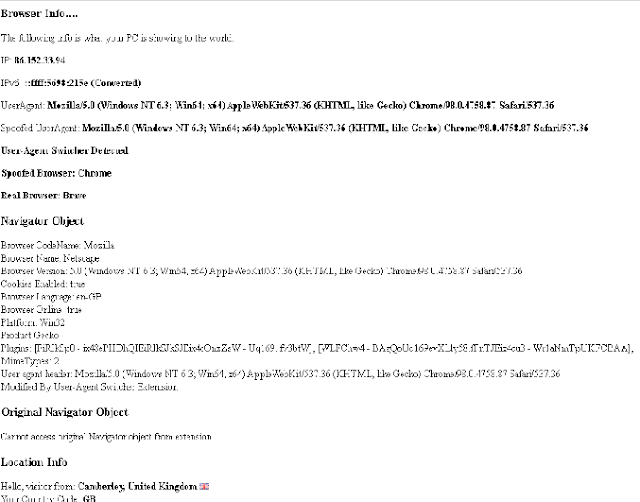
Just to show you that it works here is the "Browser" test page I keep on all my Browser's bookmark bars, written using just JavaScript with some AJAX calls and my own functions which lets me see the following info:
  • My Current IPv4 address by calling a URL that only returns IPv4.
  • My Current IPv6 address by calling a URL that will return one if I am using one, otherwise it converts the IPv4 into an IPv6 address format. Obviously, this is not my real IPv6 address as if I had one it would be returned it is just the IPv4 address converted into IPv6 format.
  • The UserAgent that the browser is showing me, this may be spoofed if a user-agent switcher is being used.
  • The real User-Agent if a spoofed user-agent is being used by a user-agent switcher extension/add-on.
  • The spoofed Browser Name.
  • The real Browser name.
  • Whether a user-agent switcher was detected. I have my own which does both the Request Header as well as overwriting the window.navigator object with different agents details. It creates a copy of the original navigator object so I can output it as well as the spoofed version.
  • An output of the current window.navigator object, if a user-agent switcher was used it will show the overwritten navigator object.
  • An output of the original window.navigator object if my own user-agent switcher was used then I create a copy of the same navigator string displayed for the current navigator object so both the spoofed and real navigator objects are outputted.
  • A script that loads in info about my location based on my IP address e.g: Town, County, Country, ISP, Hostname, Longitude, and Latitude.

Example Browser Test Output

If you look at this image, double click to open bigger if you need to, although it won't show you all the ISP & Location info at the bottom, it will show you the user-agents, both spoofed and real, as well as the spoofed browser and the real browser, which my custom function detects from either just a user-agent string or with the IsBrave() function I outputted above.


You can see here that although the user-agent strings are exactly the same my code that detects the browser has correctly recognised the real browser as Brave by using the function this article is about and for the spoofed Browser name it shows Chrome, which is the browser Brave tries to mask itself as.

This handy little script is on all my browsers bookmark bars for easy access and I find it very helpful for quickly seeing if a user-agent switcher is enabled and what if any, my browser it is pretending to be, as well as my current GEO-IP location in case I am using a global VPN, TOR, Opera or a proxy.

Let me know what you think of this function tested in Firefox, Chrome, Opera, Edge and of course Brave.

By Strictly-Software


Wednesday, 23 January 2019

SQL Regular Expressions - Extracting Income From PayPal IPN Data

Extracting Payment Amounts From PayPal IPN Data Using SQL 

By Strictly-Software

Recently I had to come up with a way on one of my sites, www.fromthestables.com, to find the total amount of income received by certain members from their PayPal subscription information. 

This is all stored in an MS SQL Payments table along with the Member ID, the PayPal IPN data and Payment type e.g P for Payment, C for Cancelled, W for Waiting, E for EOT etc.

I also have a table of Member Subscriptions which stores details of every subscription they have ever had including their Member ID, a custom GUID to identify the subscription as they could have had multiple subscriptions. Also I store their PayPal Subscription ID and details of their Sign Up Date, Cancellation Date and Next Payment Date alongside other relevant information.

If you don't know about PayPal and how to make a payment system using their shopping cart or a custom payment system then you can read up about it on their site here.

However the main thing to know is that when payments are made, recurring subscriptions started or cancelled then PayPal will send your site an Instant Payment Notification (IPN) to a callback page for you to handle.

This IPN data is a long string of text including the payers name, email, address, recurring payment information such as the number of days payments are made, plus any custom values you may need for your site such as a unique identifier (GUID).

This is useful in website systems so that you can save the new member in a database table with an ID before they go off to PayPal. When they return to your site this information can be sent back to your IPN callback page so that you can analyse the IPN data and ensure it's a valid callback attempt by making a handshake with PayPals system. Once you know it's valid information you can link the callback and IPN data string to a member by matching their Member ID with the one you stored earlier in the database.

An example of an IPN string looks like the text below and contains all the information about an IPN. There are many types of IPN strings such as those that handle cancellations, waiting, EOT (End Of Term) etc but the one I am interested in that contains two bits of information I require is the Payment Notification. 

You can see the two pieces of information in the IPN text below as they are highlighted in blue and red. The start of the string contains one part and the other is halfway through the data.

mc_gross=30.00&protection_eligibility=Eligible&address_status=confirmed&payer_id=NW2XBXPZ6C78W&address_street=Some+Street&payment_date=13%3A27%3A02+Jan+17%2C+2019+PST&payment_status=Completed&charset=windows-1252&address_zip=D02TX83&first_name=Paul&mc_fee=1.37&address_country_code=IE&address_name=Paul+Hickey¬ify_version=3.9&subscr_id=I-PLD46W039GB&custom=%7B7CD66296-0664-4A51-9ACD-05FE46821D44%7D&payer_status=verified&business=rob%40somesite.com&address_country=Ireland&address_city=Dublin&verify_sign=AczUU94BLMilZ9uHs3gDJVFDFmnrAhoedso-UI.71KEbRJ9deMwoa8KS&payer_email=paulhickey1234%40hotmail.com&txn_id=91X75169EH810362V&payment_type=instant&last_name=Hickey&address_state=DUBLIN&receiver_email=rob%40somesite.com&payment_fee=&receiver_id=5Z7P6UFG56B3P&txn_type=subscr_payment&item_name=Strictly+Software&mc_currency=GBP&item_number=%7B24C686D0-BBF5-54B6-A1D6-215AP099CD43%7D&residence_country=IE&transaction_subject=Membership&payment_gross=&ipn_track_id=98d91af71234

As you can see the amount I want is in the first part is at the beginning of the string, just after mc_gross e.g mc_gross=30.00.

However due to legacy issues of the system and I also need to connect the users PayPal subscription ID to the one I store in the members subscription table.

This is highlighted further along in the string e.g subscr_id=I-PLD46W039GB.

An example of the CLR User Defined Function I use to allow for Regular Expression Replacements can be seen below. It is connected to a DLL that contains the C# code that runs the regular expression replacing, however that is another topic altogether. You just need to know the format of the parameters for the SQL I show you later on.

Personally I store this function in the MSDB system database so that all my databases on the server can utilise it for regular expression replacements.

SET ANSI_NULLS OFF
GO
SET QUOTED_IDENTIFIER OFF
GO
ALTER FUNCTION [dbo].[udf_SQLRegExReplace](@Pattern [nvarchar](500), @MatchString [nvarchar](max), @ReplaceString [nvarchar](2000))
RETURNS [nvarchar](max) WITH EXECUTE AS CALLER
AS 
EXTERNAL NAME [asbl_SQLRegExpr].[UserDefinedFunctions].[RegExReplace]

The SQL code I use for totaling up all amounts for a certain member is below.

I use two embedded SQL UDF Replacement Functions to extract just the monetary amount and remove everything after it. I also use the same function to join the Subcriber ID in my table to the subscr_id value in the string. 

This involves using a sub-query that does the cleaning and replacing and returns the monetary value. Then an outer query uses that value and a SUM function to total all the values up.


SET ANSI_NULLS OFF
SELECT SUM(VAL) as Amount
FROM (
  SELECT CAST(msdb.dbo.udf_SQLRegExReplace('&.+?$',msdb.dbo.udf_SQLRegExReplace('^.*mc_gross=',PayPalDetails,''),'') as money) as val 
  --*
  FROM MEMBERS_PAYMENTS as p with (nolock) 
  JOIN MEMBER_SUBSCRIPTIONS as ms with (nolock) 
   ON ms.MemberFK = p.MemberFK
    AND ms.PaypalSubscriptionID = dbo.udf_SQLRegExReplace('&.+?$',dbo.udf_SQLRegExReplace('^.*subscr_id=',PayPalDetails,''),'')
    AND ms.MemberFK = 10342
  WHERE PaymentStatus = 'P'
 ) as t 
WHERE ISNUMERIC(t.VAL)=1

As you can see the SQL function calls are wrapped in an inner SQL statement so that it just returns payment values and then the outer SQL statement returns the SUM amount for a particular member ID value.

This is a good example of having to use SQL CLR Regular Expressions as well as the use of embedded functions to extract hard to get values from a long complicated string of data.

You could attempt to write the regular expression calls so that only one function call is made for the monetary amount and another one for the subscriber ID. However the IPN strings are not always similar in format and sometimes it is better for performance to break your regular expressions down into multiple replacement calls instead of writing a complicated expression to cover all possible formats.

Try it and see for yourself. See if you can re-write the query with one regular expression per extraction, and then compare the performance of the two queries with SQL Performance Monitor.

By Strictly-Software

© 2019 Stictly-Software

Thursday, 27 December 2018

Boggle - Online Game

Playing Boggle Online - A Game For XMAS In Pure JavaScript, CSS and HTML

By Strictly-Software

I made this online version of Boggle, the shake letters and make words from letters that join together as my Dad was learning JavaScript, HTML and CSS. So I made it purely in those languages.

You too can play the game if you want online on any up to date browser that is standard compliant and runs JavaScript on my site at https://www.strictly-software.com/games/boggle.html

The version I made uses a single Boggle object with a number of settings, properties and timers. I have split all the functions out into their own methods and added some features that let you edit the game such as:

-The time the game plays for. It defaults to 03:00 minutes but you can change it to any time in the 00:00 format.
-There is a drop down box with Easy, Medium and Hard for you to select. Each option has a different array of letters that are randomly picked for the game. You are more likely to get multiple X, Z and Qu's in the hard level than the easy one.
-There is an option to select the MAXIMUM red letters than appear in a game. It defaults to 3. You might not get 3 but you won't get over 3. You can change this to another numerical value up to 9. When you pick a word containing a red letter you get double points.
-There is a random tick box which means that the letters chosen for the game are purely picked at random from the alphabet array defined in the Boggle object.

If your browser is working (I have tested it on my TV, Laptop, Tablet and phone) then the countdown timer should turn from green to yellow after 90 seconds and then start flashing red during the last 30 seconds before beeping at the end.

If your TV doesn't do all this then it is down the the TV's browser. Test it online on a PC/Laptop first to ensure it all works.

We played a few games of it at Christmas and it worked perfectly.

It is an ideal way for someone learning HTML, JavaScript and CSS to understand the code, tweak it and learn about selectors, short cuts, regular expressions and so on.

It makes use of my lightweight framework which supports chaining, setting HTML, removing nodes callbacks, CSS selectors and much more

You can read about the Getme.js framework and how I made it here > http://blog.strictly-software.com/2009/10/build-your-own-framework.html.

I use SS instead of $ like jQuery and other frameworks and I am of the mindset that pure JavaScript should be used as much as possible. 

An example of chaining is joining multiple functions together with one initial selector to pick the array of nodes to work on.

SS("DIV .mycontrols input).setAtts({style:"color:black;"}).setHTML("Game Over!);

Where the node list (array) from the first selector is passed into the second function so that only those relevant nodes/elements are acted upon. Read the Getme.js article for more details.

All the files can be downloaded to your local machine to play offline and In Chrome to see the code in action go to More Tools > Developer Tools and open the Console in the bottom part of the screen.

Turn the debug variable in the Boggle.html file to true and you will see all the debug to help you understand which functions are being called and if any errors are shown they will appear in red. 

Play around and make the CSS, HTML different and add extra functions or features with JavaScript.


Enjoy the game, we did!

Monday, 26 November 2018

Obtaining an external IP address in memory for use in a Firewall Rule

Obtaining an external IP address in memory for use in a Firewall Rule

By Strictly-Software

As I am currently using an ISP which constantly changes my external IP address due to excessive use of DCHP, I have to regularly update external firewalls on servers to allow my computer remote access.

This is obviously a right pain to do and I have no idea why my ISP changes my IP address so much when my old ISP used DCHP and kept it for months at a time.

Therefore I created this little noddy VBScript to sit on my desktop to obtain my IP address and hold it in my clipboard memory ready for me to just open up my firewall and paste it in.

The code uses the MSXML2.ServerXmlHttp object to obtain the IP address from an external website which just prints it on the page and I store the Response.Text into a variable.

I then use WScript.Shell object to open a new Notepad window and write the IP address out into it.

Then I use SendKeys to select the IP address and copy it into the clipboards memory before shutting down Notepad.

This means I can just quickly double click my desktop shortcut icon to obtain the IP address ready to paste it straight into a Firewall rule.

Check this script out and when you are ready and can see that hitting CTRL + V pastes the IP address out elsewhere you should remove the "TEST SECTION" and uncomment the part above it that closes down Notepad. This ensures you are not leaving empty objects around in your computers memory.

It's not exactly amazing code but it's very helpful at this time and saves a lot of time visiting a website manually to get my external IP address.

You might find this useful yourselves!


Option Explicit

Dim IPAddress, objShell
Dim objHTTP : Set objHTTP = WScript.CreateObject("MSXML2.ServerXmlHttp")

'* Obtain external IP address and store it in a variable
objHTTP.Open "GET", "http://icanhazip.com", False
objHTTP.Send
IPAddress = objHTTP.ResponseText

'* Open Notepad
Set objShell = WScript.CreateObject("WScript.Shell")
objShell.Run "notepad.exe", 9

WScript.Sleep 1000

'* Write out the IP address to a blank notepad file
objShell.SendKeys IPAddress

'* select the IPAddress and copy it into memory
objShell.SendKeys "^{a}"
objShell.SendKeys "^{C}"

'* uncomment the following section and remove the "TEST SECTION" when you are ready

'* Close notepad with the IP address in clipboard ready to be pasted
'* Open Save Dialog
'* objShell.SendKeys("%{F4}")
'* Naviagate to Don't Save
'* objShell.SendKeys("{TAB}")
'* Exit Notepad
'* objShell.SendKeys("{ENTER}")

'* TEST SECTION - Proves that the IP address can be pasted elsewhere
WScript.Sleep 1000

'* Proof that the IP address is in the clipboard and can be pasted out
objShell.SendKeys "Test Paste Works"
objShell.SendKeys "{ENTER}"
objShell.SendKeys "^{V}"
objShell.SendKeys "{ENTER}"
objShell.SendKeys "Try a manual CTRL and V to check the IP address is still in memory"
objShell.SendKeys "{ENTER}"

'* Kill objects - DO NOT REMOVE!!
Set objShell = Nothing
Set objHTTP  = Nothing

By Strictly-Software

© 2018 Strictly-Software

Sunday, 7 October 2018

Premium Plugins Cut Half In Price!

Premium Plugins Cut Half In Price!

By Strictly-Software

Just to let you know the Premium Plugins for Wordpress, Strictly AutoTags and Strictly TweetBOT have been cut in price, by HALF!

These two plugins which can be used in conjunction with each other to fully automate a site are now only £20 each and can be purchased from my main sites secure payment page.

With both of these plugins together (both for PHP 5 and 7), feed content can be automatically loaded with a feed loading plugin before tags automatically being added to the articles with Strictly AutoTags.

Then you can Tweet out to one or more accounts different Tweets, with different content, shortened or not, with a time delay to stop Twitter Rushes with Strictly TweetBOT.

The premium plugins have many more features than the free versions and since Wordpress has taken them off their site, despite over half a million downloads, you can only get them from my site.

Try the free versions first if you want, however the options in the premium versions are there for performance, extra functionality and speed.

HALF PRICE PLUGINS TO AUTOMATE YOUR WORDPRESS SITE!

What more can you want if you work with Wordpress and feeds to give yourself good SEO, tagging and social media presence automatically?

Link your Twitter account up with a Facebook page and you can post from your site to Twitter to Facebook all whilst you work or relax.

Safely knowing you will grow your site with new tags, limit the number of deeplinking to prevent single new tags creating pages, and get your tags turned into Twitter #hashtags!

What more can you want?

Check out my Facebook page for more info!


Saturday, 18 June 2016

Why just grabbing code from the web can lead to major problems down the line

Why just grabbing code from the web can lead to major problems down the line

By Strictly-Software.com

I have wrote many articles over the years about server, system, website and PC performance, and it seems that the more versions of FireFox and Chrome that come out, the slower they get. I don't think I have ever used IE 11 as much as I have in the last 3 months. Mostly just to get Facebook, Radio 1 or Google+ to load within a minute which FF and Chrome seem to have issues with for some reason.

Some add-ons like uBlock Origin prevent 3rd party domain code from being loaded up on the site as well as large image or video/flash objects. It also stops pop-up windows and the loading of remote CSS fonts which is all the craze now.

What the developers of these websites don't seem to realise is that when they are loading in code from all over the web just to make a page display or run it causes a lot of network traffic. It also introduces the possibility that the code at the end source has been tampered with and therefore you could be loading in Cross Site Scripting hacks or ways for people to exploit your site if that certain script exists in the DOM.

Also a less likely scenario but a more common issue is that the more domains your site has to access to get all it's code onto the site, it can mean the page doesn't load as you may want it to, or even not at all.

If script A relies on Script B but Script B doesn't load for a long time then the code in Script A that was going to open a popup window on DOM Load, or play a video just isn't going to work.

I recently overrode the Window.OnError event and logged the Message, URL and Line No with an AJAX call to a log file before either throwing the error for modern sites or hiding it for older ones.

When I started looking through these files the amount of Google AdSense and Tracker scripts not loading due to timeouts is incredible. Also there are issues with bugs in the scripts or due to their slow loading objects not being available for other scripts relying on them to use. An example of just one error is:

24/04/2016 09:54:33 : 8X.XXX.XXX.161 'document.body' is null or not an object in http://ajax.googleapis.com/ajax/libs/jquery/1.3.2/jquery.min.js on line 19

People relying on Google for stats shouldn't for a number of reasons. Not only do they not always load and record the visit, but they also rely on 3rd party cookies being enabled and JavaScript being enabled. A Log parser or DB is a much better way to log every single visitor BOT or Human.

For example if you have a main jQuery script you are loading in from a CDN or from a site you don't control, if that domain is having network problems then that means any other code on the site reliant on it won't be able to work until that issue is resolved. This happens a lot from viewing the messages in my JavaScript error log file.

Due to this a lot of  people just grab the code off the net and load it in from a local server to get round network delays.

However by doing this they are stuck in a point of time (the date and the version they copied the file at). I hate this, as instead of actually learning JavaScript so they know what they are doing they are relying on some other blokes framework to solve their problems e.g have a look at whose code most of you are building your site with. If there is a bug in jQuery you either have to fix it yourself or wait for John to fix it. If it's your own code at least you can rely on your own skills and know how the code works.

The other day I had to solve a jQuery problem where the page in question was using an old version of jQuery and another 3rd party script built around jQuery (but not by John), called reveal.js.

As the front end developers wanted to move to the latest version of jQuery they suddenly found that the reveal.js code no longer worked.

After debugging it was clear that the $().live(function) had been removed and as the code that did the popup relied on reveal.js and it was built in 2011 with no recent updates. The whole revealing and hiding of modal boxes stopped as soon as a modern version of jQuery was loaded in for the site.

I had to waste time reading up on jQuery and then hardcoding the version of reveal.js as we had to use the new .on() function so that the new jQuery libraries would work with the old code that was taken from a library developed in 2011.

This is one thing I hate about front end developers who just pick n choose libraries off the web despite them all doing the same thing like event binding and removal multiple times in multiple ways.

If they are relying on a 3rd party library they took from 2011 that also relies on a constantly updated framework like jQuery that is always dropping and adding new methods, then how are people to expect sites to work when a method these libraries rely on are removed?

If they cannot write some basic notes to say that this page relies on this script e.g reveal.js, which came with jQuery 1.4.5 then it makes people like me who hate debugging other peoples frameworks hate 3rd party code even more.

Not only do I have my own getme.js framework which is simple, uses CSS selectors, linked methods where the array of objects is passed down from function to function, but now that most browsers support the simple one line of code that allows for selectors to find objects there is no need to add Sizzle.js to it any-more. Not unless you really want to support old IE versions you can just use this single line.

// where query is the CSS selector
document.querySelectorAll( query ); 

For example in my Getme.js code this following line of code will loop through all Anchor nodes with a class of menu on them inside the DIV with the ID MAIN. I just then alert out the elements ID.

G('DIV#Main > A.menu').each(function(){
   alert(this.id);
})

Obviously if you do all your styling in CSS or inline JS you have the option of how to style a series of objects for example with the .setAtts method you can pass in any element attribute and their values.

This is providing a mixture of a class and inline styles to the Paragraphs inside DIV tags. It also uses chaining where the array of object are passed from one function to the next just like other frameworks.

The first example just looks for DIV tags with P's inside and sets the class to "warningRed" and the style of the font to bold and red. The class can do most of the styling or ALL of it.

It's just an example, so is the 2nd one that shows all P tags with a SPAN with the class "info". Inside it gets a warning message with the .setHTML method and then the .setStyle method colours the text.


G('DIV > P').setAtts({class:"warningRed", style:"color:red; font-weight:bold"});

G('P > SPAN.info').setHTML('CLick for help.').setStyle({color:red, fontSize:8px});


I used a G instead of $ just to distinguish it from all the other frameworks and because it's called Getme.js.

If you want to know how to learn to write your own chainable framework then have a read of this article of mine. I've kept Getme.js simple as I hate people who just copy code from the web especially when it goes wrong.

At least this way I have a wrapper object that allows for chaining and the setting of multiple attributes at once and the use of selectors. However I still like to use pure JavaScript inside my functions so people down the line can get their heads around it.

So next time I get a jQuery problem because John Resig has decided to remove a core function from his framework which then causes a chain re-action due to all the other frameworks that were built around that version of jQuery, I can at least (hopefully) use my simple framework to apply the CSS that the designers need to rather than spend a day hunting around for fixes to other people's code.

That, is something I really hate doing.


By Strictly-Software.com 

© 2016 Strictly-Software.com

Tuesday, 17 May 2016

Stopping BOTS - A Multi Layered Approach

Stopping BOTS - A Multi Layered Approach


By Strictly Software

Some people don't mind BOTS of all shapes and form roaming their sites but if you actually look into what they are doing should you be worried about their actions?

Have you examined your log files lately to see what kind of BOTS are visiting and how much bandwidth they are using?

Here are a few of the reasons you might want to care about the type of actions carried out by automated crawlers (BOTS):

1. They eat bandwidth. Social media BOTS especially who jump onto any link you post on Twitter causing Twitter Rushes. This is where 50+ BOTS all hit your site at the same time and if you are not careful could use up all your memory and cause a frozen system if not configured properly. There are plenty of articles about Twitter Rushes on this site if you use the search option down the right hand side to find more details.

2. Bandwidth costs money. If you are a one man band or don't want high server costs then why would you want social media BOTS, many that provide no benefit to you, costing you money just so they can provide their own end users with a service?

3. Content theft. If a user-agent identifying itself as IE6 is hitting a page a second is it really a human using an old IE browser visiting that many pages? Of course not. However for some reason IE 6 is the most popular user-agent used by script kiddies, scrapers and hackers. Probably because they have just downloaded an old crawler script off the web and run it without the knowledge to edit the code and change the agent. Look for user-agents from the same IP hitting lots of pages per minute and ask yourself are they helping your business or just slowing your site down by not obeying your robots.txt crawl-delay command?

4. Hacking. Automated hackbots scan the web looking for sites with old OS systems, old code and potential back doors. They then create a list of sites for their user and come back to penetrate these sites with SQL/XSS injection hacks. Some might show up in GET requests in the log file but if they are tampering with FORM elements then any POSTED data containing hack vectors won't show up. Hiding key response parameters such as your server brand and model and the scripting language you use are good simple measures to prevent your sites name ending up on this list of potential targets to hack and can easily be configured in config files on your system.

Therefore you should have a defence against these type of automated BOTS. Of course you also have the human hacker who might find a sites contact form, view the source, tamper with the HTML and work out a way to modify it so he can send out mass emails from your server with a custom script. Again security measures should be implemented to stop this. I am not going to talk about the basics of security when it comes to preventing XSS/SQL injection but the site has many articles on the topic and basic input sanitation and database login security measures should stop these kinds of hack.

So if you do want to stop automated BOTS from submitting forms, registering to your site, applying for jobs and anything else your site might do the following list might be helpful. It is just an off the head list I recently gave to someone on LinkedIn but could be helpful if expanded to your own requirements.

On my own sites I use a multi pronged approach to stop BAD BOTS as well as bandwidth wasting social media BOTS, hack bots and even manual hackers tampering with the forms. It saves me money as well as increases performance by allowing legit users only to use the site. By banning over 50% of my traffic which is of no benefit to me I can give the 50% of useful traffic a better user experience.

1) We log (using Javascript), whether the user has Javascript enabled e.g an AJAX call on the 1st page they hit that sets a session cookie using Javascript. As most BOTS don't use Javascript we can assume if they have Javascript enabled they are "probably" human.

2) We also use Javascript (or the 1st page HTTP_ALL header in IE) to log whether Flash is enabled and the version. A combo of having Flash running and Javascript isbetter than just Javascript on it's own.

3) I have my own logger DB that records browser fingerprints and IP's, Useragent, Javascript, Flash, HTTP settings, installed apps, browser extensions, Operating System and other features that can almost uniquely identify a user. The problem is of course an IP often changes either through DCHP or the use of proxies, VPN's and hired VPS boxes for an hour or two. However it does help in that I can use this combination data to look up in my historical visitor database to see what rating I gave them before e.g Human, BOT, SERP, Hacker, Spammer, Content Thief and so on. That way if the IP has changed but the majority of the browser finger print hasn't I can make an educated guess. If I am not 100%  sure however I will then go into "unsure mode" where security features such as CAPTCHAS and BOT TRAPS are introduced just in case. I can then use Session variables if cookies are enabled to store the current status of the user (Human, BOT, Unknown etc), or use my visitor table to log the browser footprint and current IP and do lookups on pages where I need to use defensive measures if cookies are not enabled.

4) These Session/DB settings are then used to decide whether to increment banner hit counters, write out emails in images or with Javascript so that only humans can see them (to prevent BOT email scrapers), and other defensive measures. If I know they are 100% human then I may chose not to deploy these measures.

5) On forms like contact forms I often use BOT Traps. These are input elements that are in the flow of the form with names like email_extra that are hidden with CSS only. If the BOT submits a value for this hidden input I don't submit the form, or I do but without carrying out the desired action and not let the BOT know that nothing happened.

6) A lot of forms (especially contact forms) can be submitted by just entering an email address for all fields (name, email, password etc). Therefore I check that the field values are different e.g not the same value for an email AND password field. I also ensure the name matches a name pattern with a regular expression.

7) I have built my own 2 stage CAPTCHA system which can be turned on or off on the fly for forms where I don't know if the user is 100% human OR I can decide to just always have it on. This is based around a maths question, where the numbers are in 3 automatically created images, grey and blurry like normal CAPTCHA's The user has to first extract the right numbers from the images then carry out an automated sum from those numbers e.g add number 1 to number 2 and deduct number 3. This works very well as it requires a human brain to interpret the question and not just use OCR techniques to extract the CAPTCHA image values. There are so many OCR breakers out there that a standard CAPTCHA where you enter the word on the picture can easily be cracked automatically now.

8) If there is textarea on the form, contact, application etc, then I use my RUDE word table which has hundreds of variants of rude words and the regular expression next to it to detect them. This can obviously be updated to include pharmacy pill names, download movies, porn and other spam words.

9) I also have a number of basic regular expressions if the user wants light detection that checks for certain strings such as "download your xxx now", "buy xxx for just $£", and words like MP3s, Films, Porn, Cialis and other common spam words that would have no place on a site not selling such goods.

10) I always log any blocking so I can weed out any false positives and refine the regular expressions etc.

11) I also have an incremental ban time so the 1st time anyone gets banned is for 1 hour, then 2, then 4 then a day etc etc.The more times they come back the longer they get banned.

12) Sometimes I use JavaScript and AJAX to submit the form instead of standard submit buttons. As Javascript is so commonly used now (just look at Google), then most people have it enabled otherwise the majority of sites just wouldn't work or would have minimum features. It would require a human hacker to analyse your page to break it and then write a custom BOT just to hack the form when a technique like this is used. To get round this you can use a rolling random key created server side, inputted into a hidden element with Javascript on page load and then examined on form submission to ensure it is correct. If it's not then the person has tampered with the form by entering an old key not the new key and can be banned or blocked.

13) Another good way to stop automatic hack BOTs (ones that just roam the web looking for forms to try and submit and break out of to send emails etc - contact forms), is to not use FORM tags in your server side code but have compressed and encrypted JavaScript that on page load converts the <div id="form">....</div> into a real FORM with an action, method etc. Anyone viewing the non generated source code like most BOTS, won't see a FORM there to try to hack. Only a generated HTML source view (once the page has loaded), would show them this, which most BOTS would not be able to view.

14) Honeypots and Robots.txt logging is also useful e.g log any hit to the robots.txt file and for any BOTS that don't visit it before crawling your site. You can then make a decision to ban them for breaking your Terms Of Service for BOTS that should state they should obey your Robots.txt rules.

15) As BAD BOTS usually use the links in the DISALLOW section of Robots.txt to crawl anyway. Then putting a fake page in the list of URLs is a good idea. This page should be linked to from your site in a way that humans cannot see the link and accidentally visit it (and if they do it should have a Javascript link on it to enable them to get back to the site). However BAD BOTS will see the link in the source and crawl it. As they have broken your TOS and followed a URL in your DISALLOW list they are being doubly "bad", so you have the right to send them off to a honeypot (many exist on the web that either put emails out for them to extract then wait for an email to be sent to that address to prove they are an email scrapper bot) OR they get sent to an unbreakable maze like system which auto generate pages on the fly so that the BOT just keeps going around in circles crawling page after page and getting nowhere. Basically wasting their own bandwidth.

16) HTACCESS Rules in your .htaccess file should identify known bad bots as well as IE 6, 5 and 5.5 and send them off to a 403 page or a 404 so they don't realise they have been sprung. No-one in their right mind should be using these old IE browsers anymore however most downloadable crawlers used by script kiddies still use IE 6 as a user-agent for some reason. My guess is that they were written so long ago that the code hasn't changed or that people had to support IE 6 due to Intranets being built in that technology e.g using VBScript as the client side scripting language.

By using IE 6 as a UA they get access to all systems due to sites having to support that ancient horrible browser. However I ban blank user-agents, user-agents less than 10 characters long, any that contain known XSS/SQL injection vectors and so on, There is a good PHP Wordpress plugin called Wordpress Firewall that if you turn on all the features and then examine the output in your .htaccess file will show you some useful rules such as banning image hot linking that you can then nick for your own file.

17) Sending bad bots back to their own server is always a good trick so that they get no-where on your own site. Another good trick is to send them to a site that might scare the hell out of them once they realise they have been trying to hack or DDOS it https://www.fbi.gov/wanted/cyber or the METS Cyber Crime department.

These are just a few of the security measures I use to stop BOTS. It is not a comprehensive list but a good starting point and these points can be expanded and automated depending on who you think is visiting your site.

Remember most of these points are backed up with detailed articles on this site so have a search if anything spikes your interest.

Hope this helps.

By Strictly Software


© 2016 Strictly Software

Tuesday, 9 February 2016

SQL To Find The Latest Modified Database Objects

SQL To Find The Latest Modified Database Objects

By Strictly-Software

Lots of times I want to quickly see which database objects I have modified lately without having to open up specialist programs such as AdeptSQL or Redgate etc.

By using the System Views you can easily find the objects you have recently created or modified.

The sys.objects view is what we use here and we can filter the types of object very easily with the [type] column.

The (main) values for this are:

P = Stored Procedure 
U = User Table (includes non clustered indexes added to it) 
D = Default Value Constraint 
FN = Scalar User Defined Function 
TF = Table User Defined Function 
PK = Primary Key 
UQ = Unique Constraint 
SN = Synonym
V   = View

If you really wanted to, you could search the system tables, default constraints, and other objects such as...

D   = Default Constraint
F   = Foreign Key Constraint
FS = CLR Scalar Function
PC = CLR Stored Procedure
IF  = SQL Inline Table Valued Function
IT  = Internal Table
S    = System Table
SQ = Service Queue
X   = Extended Stored Procedure


This example however looks for the latest modified User Defined Functions (Scalar and Table), and Stored Procedures.


SELECT name, create_date, modify_date, [type]
FROM sys.objects
WHERE [type] IN('P' , 'FN', 'TF')
ORDER BY modify_date DESC


This example looks for the most recent created stored procedures that start with the name usp_net_save


SELECT name, create_date
FROM sys.objects
WHERE [type] = 'P' 
 AND name like 'usp_asp_save%'
ORDER BY create_date DESC


This is a very quick and easy way to find the code in an SQL database that you have either modified or updated.

By Strictly-Software

© 2016 Strictly-Software

Tuesday, 29 September 2015

IE Bug with non Protocol Specific URLS

IE Bug with non Protocol Specific URLS

By Strictly-Software

I have recently come across a problem that seems to only affect IE and non protocol specific URLS.

These are becoming more and more common as they prevent warnings about insecure content and ensure that when you click on a link you go to the same protocol as the page you are on.

This can obviously be an issue if the site you are on is on an SSL but the site you want to go to doesn't have an HTTPS domain or vice-versa. However most big sites have both domains and will handle the transfer by redirecting the user and the posted data from one domain to another.

An example would be a PayPal button that's form posts to

action="//www.paypal.com/"

In the old days if you had a page on an SSL e.g https://www.mysite.com and had a link to an image or script from a non secure domain e.g http://www.somethirdpartysite.com/images/myimg.jpg you would get pop ups or warning messages in the browser about "non secure content" and would have to confirm that you wanted to load it.

Nowadays whilst you don't see these popups in modern browsers if you check the console (F12 in most browsers) you will still see JavaScript or Network errors if you are trying to load content cross domain and cross protocol.

S2 Membership Plugin

I came across this problem when a customer who was trying to join one of my WordPress subscription sites (that uses the great free S2 Membership Plugin), complained to say that when he clicked a payment button that I have on many pages, was being taken to PayPal's homepage rather than the standard payment page that details the type of purchase, price and options for payment.

It was working for him in Chrome and FireFox but not IE.

I tested this on IE 11 Win7 and Win8 myself and found that this was indeed true.

After hunting through the network steps in the developer toolbar section (F12) and comparing it to Chrome I found that the problem seemed to be IE doing a 301 redirect from PayPals HTTP domain to their HTTPS one. 

After analysing the response and request headers I suspect it is something to do with the non UTF-8 response that PayPal was returning to IE for some reason, probably because Internet Explorer wasn't requesting it as such for some reason.

Debugging The Problem


For the techies. This is a breakdown of the problem with network steps from both Chrome and IE and relevant headers etc.

First the Paypal button code which is encrypted by S2Member on the page. You get given the button content as standard square bracket short codes which get converted into HTML on output. Looking at the source on the page in both browsers on one button I could see the following.

1. Even though the button outputs the form action as https://www.paypal.com it seems that one of my plugins OR WordPress itself, although I suspect a caching plugin obviously, is changing my links (I haven't been able to narrow it down - or WordPress) is removing any protocols conflicts by using non protocol specific URLS.

So as my site doesn't have an SSL any HREF, SRC or ACTION that points to an HTTPS URL was being replaced with // e.g https://www.paypal.com on my page http://www.mysite.com/join was becoming //www.paypal.com in the source and generated source.

2. Examining the HTML of one of the buttons you can see this in any browser. I have cut short the encrypted button code as it's pointless outputting it all.


<form action="//www.paypal.com/cgi-bin/webscr" method="post">
<input type="hidden" name="cmd" value="_s-xclick">
<input name="encrypted" type="hidden" value="-----BEGIN PKCS7-----MIILQQYJKoZIhvcNAQcEoIILMjCCCy4CAQExgg..."


3. Outputting a test HTML page on my local computer and running it in IE 11 WORKED. This is was probably because I explicitly set the URL to https://www.paypal.com so no redirects were needed.

4. Therefore logically the problem was due to the lack of an HTTPS in the URL.

5. Comparing the network jumps.

1. Chrome

Name - Method - Status    - Type                     - Initiator
webscr - POST - 307      - x-www-form-urlencoded    - Other
webscr - POST - 200 - document             - https://www.paypal.com/cgi-bin/webscr

2. IE

URL         - Protocol  - Method - Result - Type       - Initiator
/cgi-bin/webscr         - HTTP      - POST   - 301       -           - click
/cgi-bin/webscr         - HTTPS    - POST   - 302       - text/html  - click
https://www.paypal.com/home - HTTPS   - POST   - 200       - text/html  - click

Although the titles are slightly different you can see they just are different words for the same thing e.g Status in Chrome or Result in IE both relate to the HTTP Status code the response returned.

As you can see Chrome also had to do a 307 (HTTP 1.1 successor to the 302 temporary redirect) from HTTP to HTTPS however it ended up on the correct page. Whereas in IE when I first clicked on the button it took me to the payment page in HTTP but then did a 301 (permanent) redirect to it in HTTPS and then a 302 (temporary) redirect to their home page.

If you want to know more about these 3 redirect status codes this is a good page to read.

The question was why couldn't IE take me to the correct payment page?

Well when I looked at the actual POST data that was being passed along to PayPal from IE on the first network hop I could see the following problem.

cmd=_s-xclick&encrypted=-----BEGINã² ----MIILQQYJKoZIhvcNAQcEoIILMjCCCy4CAQExgg...

Notice the Chinese character after the BEGIN where it should say PKCS7?

In Chrome however this data was exactly the same as the form e.g

cmd:_s-xclick
encrypted:-----BEGIN PKCS7-----MIILQQYJKoZIhvcNAQcEoIILMjCCCy4CAQExgg...

Therefore it looked like for some reason the posted data was being misinterpreted by IE whereas in Chrome it was not. Therefore I needed to check what character sets and response was being sent and returned.

Examining Request and Response Headers

When looking at the HTTP Request headers on the first POST to PayPal in IE I could see that the Accept-Language header was only asking for en-GB e.g a basic ASCII character set. Also there was quite a lack of request headers compared to IE. I have just copied the relevant ones that can be compared between browsers.

IE Request Headers

Key         Value
Content-Type: application/x-www-form-urlencoded
Accept-Language: en-GB
Accept-Encoding: gzip, deflate
Referer: http://www.mysite.com/join-now/
User-Agent: Mozilla/5.0 (Windows NT 6.1; WOW64; Trident/7.0; rv:11.0) like Gecko
Request: POST /cgi-bin/webscr HTTP/1.1
Accept: text/html, application/xhtml+xml, */*
Host:         www.paypal.com

Chrome Request Headers

Key                 Value
Accept: text/html,application/xhtml+xml,application/xml;q=0.9,image/webp,*/*;q=0.8
Accept-Encoding:gzip, deflate
Accept-Language:en-GB,en-US;q=0.8,en;q=0.6
Cache-Control: max-age=0
Connection: keep-alive
Content-Length:4080
Content-Type: application/x-www-form-urlencoded


And the responses for the Content-Type header which I think is key.

IE

Content-Type: text/html

Chrome

Content-Type: text/html; charset=UTF-8


So whilst Chrome is saying it will accept more language sets and gets back a charset of UTF-8 IE is only saying it will accept only en-GB and gets back just text/html.

I even tried seeing if I could add UTF-8 in as a language to accept in IE but there was no option to, so I tried adding Chinese which obviously use extended character sets and was the problematic character.
 However this made no difference even though the Accept-Language header was now:

Accept-Language: en-GB,zh-Hans;q=0.9,zh-CN;q=0.8,zh-SG;q=0.7,zh-Hant;q=0.6,zh-HK;q=0.4,zh-MO;q=0.3,zh-TW;q=0.2,zh;q=0.1

Conclusion


Therefore I came to the conclusion that I could not force IE to change it's behaviour and I doubt any phone calls to IE HQ or even PayPal would solve the issue. Therefore to allow IE users to be able to still pay on my site I needed a workaround.

1. I added to my technical test page which I make all users check before paying a test for IE and a warning about possible problems. This went alongside tests to ensure JavaScript and Cookies were enabled as both are needed for any modern JavaScript site.

2. I added in some JavaScript code in my footer that run on DOM load that looped through all FORM elements and checked the ACTION attribute. Even though when examining the results in the console they showed http://www.paypal.com rather than what I saw in the source //www.paypal.com I added some code in to ensure they always said HTTPS.

The function if you are interested is below and it seems to have fixed the problem in IE. If I view the generated source now I can see all form actions have HTTPS protocols.


// on DOM load loop through all FORM elements on the page
jQuery(document).ready(function () {	
	// get all form elements
	var o,,e=document.getElementsByTagName("FORM");
	for(var i=0,l=e.length;i<l;i++)
	{
		// get the action attribute
		o = e[i].action;

		// if current action is blank then skip
		if(o && o!="")
		{
			// if the start of the action is http (as non protocol specifc domains show up as http)
			// then replace the http with https
			if( /^http:\/\/www.paypal.com/.test(o) )
			{
				e[i].action = o.replace("http:","https:");
			}		
		
		}
	}	
});


So whilst this is a just a workaround for the IE bug it does solve the issue until Internet Explorer sorts itself out. Why they have this problem I have no idea.

I am outputting all my content as a UTF-8 charset and Chrome is obviously handling it correctly (along with Firefox and Safari).

So I can only presume it's an IE bug which isn't helped by an unknown (as yet) plugin (or WordPress) changing cross protocol URLs to the now standard //www.mysite.com format.

Therefore if you come across similar problems with redirects taking you to the wrong place, check your headers, compare browsers and if you spot something strange going on, try a JavaScript workaround to modify the DOM on page load.


© 2015 Strictly-Software