Showing posts with label opera. Show all posts

Thursday, 3 February 2022

Testing For The Brave Browser

How Can We Test For Brave?


By Strictly-Software

The problem with detecting the Brave browser which I use most of the time is that it hides as Chrome and doesn't have its own user agent. It used to, and the hope is that in the future it will again but at the moment it just shows a Chrome user-agent. 

For example, my latest Brave user-agent is:

Mozilla/5.0 (Windows NT 10.0; Win64; x64) AppleWebKit/537.36 (KHTML, like Gecko) Chrome/97.0.4692.99 Safari/537.36

It also apparently used to have a property on the windows object window.Brave which is no longer there anymore. I have read many articles on StackOverflow about detecting Brave and all the various methods that apparently used to work don't anymore due to objects and properties such as window.google and window.googletag no longer exists on the windows object.

As these posts were not written that long ago it seems that there have been a lot of changes on the window object by Chrome / Google / Brave etc. So when writing your own function as I did it is worth outputting all the keys on the window object first to see what is there and what isn't e.g.

const keys = Object.keys(window);
console.log(keys);

This just outputs all the keys such as events, other objects like document and navigator, and properties as well into the developer tools console area that all modern browsers have.

As Brave, Edge, Opera and Chrome are all based on the same Chromium browser they are basically the same standard-compliant browsers.

Remember we should always use feature detection rather than user-agent parsing to choose whether or not to do something in JavaScript but it is amazing when using a user-agent switcher how many modern-day sites break when I change a standards-compliant browsers agent string to IE 6 for example.

If the coder wrote their code properly it wouldn't matter if I changed the latest version of Chromes user-agent to IE 6 or even IE 4 or Netscape Navigator 4, all sites should work perfectly as instead of doing old school tests like

isIe = document.all;
isNet = document.layers;

And then branching off those two as we did in the old days of scripting which led to browsers like Opera which no one catered for, having to support both IE and Netscape event handlers and pretending to not exist. However, they did eventually add the Opera property to the window object so if you really wanted to find it you could just test for:

if(window.opera){
  alert("This is Opera");
}

However, this no longer exists and Opera uses the same WebKit Chromium base as all the other modern browsers apart from Firefox.

Also, remember that the issue with JavaScript is that every object can be overwritten or modified, that is why we have user-agent switchers in the first place because they can, and do overwrite and change the window.navigator object.

Therefore if you are really pedantic there is NO real way to test if anything is real in JavaScript as a plugin or injected script could have added properties to the Window object such as changing the user-agent or adding a property another browser uses to the window so that tests for window.chrome fail in FireFox because you have created a window.chrome property FireFox detects.

There are loads of ifs and buts and we can discuss the best approach all day due to injected code and extensions overwriting objects or accidental setting of objects by forgetting to do == and accidentally setting a variable or object with a single = by mistake, but let's answer the question,

I have read a lot about people trying to detect Brave and a lot of old objects on the Chrome browser like window.google and window.googletag that no longer exist or even window.Brave which apparently existed on the window object at one stage. 

Why might you want to even detect Brave if it is a standards-compliant Browser and you are doing feature detection and not user-agent sniffing anyway you might ask? 

Well good question, if you are writing your code properly you shouldn't ever need to know what Browser the code is running in as it will work whatever the user is running your web page in due to proper use of feature detection. 

However, you may have a site that wants to direct people to the right extension depository or download the correct add-on. Therefore to make the user comfortable in their decision you might want to show that you know what browser the user has so that they are happy downloading the add-on. 

Or there might be a myriad of other reasons such as asking users to update their browser due to an exploit that has been discovered or to ask old people still using IE6 to upgrade to a modern browser. Also if you want them to use one that removes cookies, trackers, and adverts, and is security conscious, you may want to direct non-Brave users to the Brave download page.

Therefore the function I have come up with tries to future proof by hoping Brave does put its name into the user-agent at some point, and it checks for the existence of properties in objects such as the window or navigator object.

You can put all your complaints and ideas for improving this function for detecting Brave in the comments section and maybe we can come up with a better solution.

// pass or don't pass in a user-agent if none is passed in it will get the current navigator agent
function IsBrave(ua){
	
	var isBrave = false;
	ua = (ua === null || ua === undefined) ? ua = window.navigator.userAgent : ua;

	ua = ua.toLowerCase();

	// make sure it's not Mozilla
	if("mozInnerScreenX" in window){		
		return isBrave;
	}else{
		// everything in JavaScript is over writable we could do this to pass the next test 
		// but then where would we stop as every object even window/navigator can be overwritten or changed...?
		// window.chrome="mozilla";
		// window.webkitStorageInfo = "mozilla";

		// make sure its chrome and webkit
		if("chrome" in window && "webkitStorageInfo" in window){
			// it looks like Chrome and has webkit
			if("brave" in navigator && "isBrave" in navigator.brave){
				isBrave = true;
			// test for Brave another way the way the framwwork Prototype checks for it
			}else if(Object.prototype.toString.call(navigator.brave) == '[object Brave]'){
				isBrave = true;			
			// have they put brave back in window object like they used to
			}else if("Brave" in window){
				isBrave = true;			
			// hope one day they put brave into the user-agent
			}else if(ua.indexOf("brave") > -1){
				isBrave = true;
			// make sure there is no mention of Opera or Edge in UA
			}else if(/chrome|crios/.test(ua) && /edge?|opera|opr\//.test(ua) && !navigator.brave){
				isBrave = false;			
			}
		}

		return isBrave;
	}
}

Of course if you really didn't want all these fallback tests and hope that Brave will sort their own user-agent out in the future or re-add a property to the window object as they apparently used to then you could just do something like this:
var w=window,n=w.navigator; // shorten key objects
let isBrave = !("mozInnerScreenX" in w) && ("chrome" in w && "webkitStorageInfo" in w && "brave" in n && "isBrave" in n.brave) ? true : false;

Just to show you that it works here is the "Browser" test page I keep on all my Browser's bookmark bars, written using just JavaScript with some AJAX calls and my own functions which lets me see the following info:
  • My Current IPv4 address by calling a URL that only returns IPv4.
  • My Current IPv6 address by calling a URL that will return one if I am using one, otherwise it converts the IPv4 into an IPv6 address format. Obviously, this is not my real IPv6 address as if I had one it would be returned it is just the IPv4 address converted into IPv6 format.
  • The UserAgent that the browser is showing me, this may be spoofed if a user-agent switcher is being used.
  • The real User-Agent if a spoofed user-agent is being used by a user-agent switcher extension/add-on.
  • The spoofed Browser Name.
  • The real Browser name.
  • Whether a user-agent switcher was detected. I have my own which does both the Request Header as well as overwriting the window.navigator object with different agents details. It creates a copy of the original navigator object so I can output it as well as the spoofed version.
  • An output of the current window.navigator object, if a user-agent switcher was used it will show the overwritten navigator object.
  • An output of the original window.navigator object if my own user-agent switcher was used then I create a copy of the same navigator string displayed for the current navigator object so both the spoofed and real navigator objects are outputted.
  • A script that loads in info about my location based on my IP address e.g: Town, County, Country, ISP, Hostname, Longitude, and Latitude.

Example Browser Test Output

If you look at this image, double click to open bigger if you need to, although it won't show you all the ISP & Location info at the bottom, it will show you the user-agents, both spoofed and real, as well as the spoofed browser and the real browser, which my custom function detects from either just a user-agent string or with the IsBrave() function I outputted above.
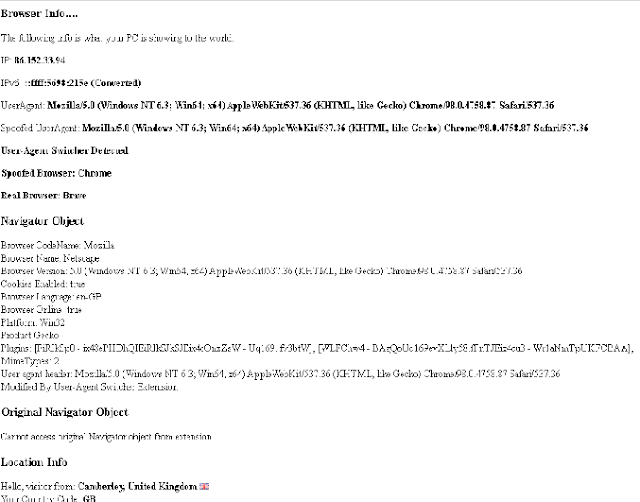


You can see here that although the user-agent strings are exactly the same my code that detects the browser has correctly recognised the real browser as Brave by using the function this article is about and for the spoofed Browser name it shows Chrome, which is the browser Brave tries to mask itself as.

This handy little script is on all my browsers bookmark bars for easy access and I find it very helpful for quickly seeing if a user-agent switcher is enabled and what if any, my browser it is pretending to be, as well as my current GEO-IP location in case I am using a global VPN, TOR, Opera or a proxy.

Let me know what you think of this function tested in Firefox, Chrome, Opera, Edge and of course Brave.

By Strictly-Software


Thursday, 12 December 2019

Browsers New Automatic Settings Slowing Site Loads Down

Blocking All Social Media Cookies and Trackers Seems To Be Slowing Down Chrome and FireFox

By Strictly-Software

I have had recent automatic updates for Firefox and Chrome to versions

Mozilla/5.0 (Windows NT 6.3; Win64; x64; rv:71.0) Gecko/20100101 Firefox/71.0

and 

Mozilla/5.0 (Windows NT 6.3; Win64; x64) AppleWebKit/537.36 (KHTML, like Gecko) Chrome/78.0.3904.108 Safari/537.36

How these two have got to versions nearing 80 so quickly is funny, when IE just rolls out a new version of it's browser every year or so not every time I try and open Firefox from my taskbar.

However these updates seem to contain some important settings, some may have been around for a while which I just haven't noticed. However it is the slowness of these browsers compared to Opera, that uses a proxy server in it's pretend VPN, so you are actually going through 2 servers to your site compared to the other browsers, that is doing my head in.

I liked Firefox, and Chrome when it first came out for their speed, and add-ons. However either my laptop is either deciding to slow down these 2 browsers for some reason and let Opera hop before loading a faster page or something else is going on.

My version of Opera with this "VPN" is:

Mozilla/5.0 (Windows NT 6.3; Win64; x64) AppleWebKit/537.36 (KHTML, like Gecko) Chrome/78.0.3904.108 Safari/537.36 OPR/65.0.3467.62

When I open it, it is faster than both Chrome and FireFox despite their VPN which when I check with a geo location website shows I have these details instead of my real ones:
  • Your Public IPv6 is: 2001:67c:2660:425:7::dfa
  • Your IPv4 is: 77.111.247.105
  • Location: Amsterdam, NH NL 
  • ISP: Hern Labs AB
I notice they have removed the word Opera and replaced it with OPR now, also nearing it's 70th edition. So not only does it protect my privacy a bit it is faster than Chrome and FireFox at the moment for me.

So today after upgrades to both Chrome (manual due to it's insane slowness) and an automatic update for FireFox that took almost 20 minutes, I noticed major slowdowns.

Chrome seems to always be showing a "resolving host" message in the status bar and loading in remote scripts from the big 3 spyware social networks, Twitter, Facebook and Google.

Of course site builders have put these outbound scripts into their code as they want people to Like, Follow and Tweet whatever crap they are selling and you may like seeing a Twitter scroller on the blog you are following and the ability to share the page to Facebook.

However I watched a video on www.darkpolitricks.com the other night about how many #alttnews sites are moving their videos from YouTube to BitShute. YouTube is broken and Google is an evil company. And it seems they are indeed.

It is all about how these niche news outlets had created YouTube making it the biggest video sharing site online, and although the company claims they are only 1% of all videos watched they still feel the need to de-rank these alternative views and put "authoritative sources" above your searches in their algorithm tweaks. These tweaks were all admitted by a Google employee who described getting those Up Ticks and Likes as a "drug" that ensures people continue with their outpourings of every thing they do in life on Social Media.

Yes we do want to see where Jane is having lunch, who with, where the cafe is located and then everything else she does that day as we follow her goings about on Facebook and Instagram.Well you may want to but I don't. However to do so you need to load in Facebook scripts from their servers.

However it seems if you delve into the privacy and security settings for Firefox you get to see that their default setting is to stop tracking cookies from cross site and social media trackers which obviously means if you are loading a 3rd party script from another location you could see as I did today on one site the "trying to connect to t.co" message appear dozens of times as the page tried to load. All the while the page was hung and unusable.

You can go into the FireFox settings and change your settings under Privacy and Security. The heading is...

Browser Privacy

Enhanced Tracking Protection

Trackers follow you around online to collect information about your browsing habits and interests. Firefox blocks many of these trackers and other malicious scripts.

The default setting will block Social media trackers, Cross-site tracking cookies, Tracking content in Private Windows and Cryptominers.

Obviously the latter few are definitely required but let me know if you have noticed a slow down with the standard setting that supposedly is "Balanced for protection and performance. Pages will load normally.", as they may load normally but they seem very slow to load, and off server scripts like Twitter and Facebook are attempted multiple times before a page is usable.

What happened to just loading the core code first to let the page be usable and load any off server scripts by Ajax in the background. It seems too many sites now use pure JavaScript and Ajax to load the content, probably to prevent content scraper BOTS however it does mean a lot of code has to run and be loaded before the page is usable. Have you had a look at the source HTML of www.google.com lately?

Apart from some META tags after the HTML tag the whole source is JavaScript and probably Ajax to load in the content for what is really nothing more than a white page with a different image every now and then above a text input box for searching.

The links to your Google account and Gmail in the top right corner are just that links. We could shorten the load time and the code to a few lines of HTML in reality. I really think Google have gone overboard with their API Jizz all across their systems as their need to stop scrapers has just caused slow loading pages it seems.

Would you like all 3rd party scripts and cookies blocked, or would you like the site to work and load quickly? It seems a dilemma these browsers are making over complicated especially for non techies who wouldn't know half the words in Firefox's Privacy and Security settings.

The difference between Standard which says "Balanced for protection and security. Pages will load normally" and Strict which says "Stronger protection, but may cause some sites or content to break" seems to only be the addition of:
  • Tracking content in all windows - rather than standard mode which only blocks "Tracking content in Private Windows" and
  • Fingerprinters (blocking Browser finger printing, logging your add-ons, window size and other ways to identify you from just your browser)
They don't actually explain what a fingerprinter is, and to the average user they would be scratching their head thinking about their latest Samsung phone and the ability to login using your fingerprint. However these two extra blocks seem to be deadly for a working website as they state underneath :
Heads up! Blocking trackers could impact the functionality of some sites. Reload a page with trackers to load all content.
So god knows how someone is supposed to manage the 3rd option which is a custom way of blocking things you don't understand or know why they would break a site.

Of course they have a number of complicated Knowledge Base articles  for you to read and get your head round to try and understand whether they need to use Private Windows for browsing all the time, and why the prevention of loading certain features is going to stop your site loading.

Of course Firefox has a "simple way" to help you understand what is going on by just clicking on the shield in the address bar you can change the mode of protection on or off. 

You can view this site with "Enhanced Tracking Protection is OFF for this site" or ON and if you don't know what the difference is they have helpful little graphs that tell you about their Enhanced Tracking Protection, how many trackers they have blocked over the week and ways to look for data breaches. All very interesting but not very helpful information.

They helpfully clarify the situation by saying "Social networks place trackers on other websites to follow what you do, see, and watch online. This allows social media companies to learn more about you beyond what you share on your social media profiles."

Of course you could just disable 3rd party cookies and JavaScript by default with a web developer toolbar and see if the page loads or not. If it doesn't work turn on JavaScript and try again before white listing the site so it can use JavaScript again.

It seems that as Windows in numptifying the front end of their latest operating systems and making it harder for developers to dig in and get into the back end like Windows 8.1r which I still have - now without Skype support - the browsers are offering their users far too many options they probably don't understand or need to know about.

What I want from a browser is for websites to load quickly, any 3rd party hosted widgets like Facebook or Twitter widgets to load in asynchronously and not prevent the working of the site. I want the browser to do the dirty stuff behind the scenes and I don't want 100's of options to play about with. They should block dangerous content, warn users about dangerous sites and stop anything that may have a dangerous effect on my browsing or privacy.

Yes - Ask me if I want to load this soon to be outdated flash movie or allow notifications but don't give me too much to tweak about with.

The speed of loading a site is the most important factor for most users and also affects the sites SEO. If they want to give us an option for being as private as possible or allowing tracking cookies then just have a single option "Privacy HIGH or OFF" option, and then use their own browsing logic to work out if a page won't load instead of offering the user a whole list of options to try out if a page doesn't load.

What is wrong with just keeping incognito windows that are private as possible, don't allow trackers or fingerprinting and the logging of pages visited with a clear out of cookies automatically when I leave?

It just seems that as Chrome enters the laptop world with it's Chromebooks, that as Operating Systems continually ask for your admin password in Windows 10+ when opening an application. Hiding all the nitty gritty that really slows your PC down behind automated "maintenance jobs". That browsers are trying to become their own little PC within a PC.

Just give me fast loading pages and if I want to hide what I am doing from sites and other users of my laptop then make the incognito windows as private as possible. Stop trackers, fingerprinting, 3rd party cookies, and anything else you are now making a "choice" for the user under the settings.

It is bad enough that as everyone moves to HTTPS we see the TLS handshake message in the taskbar constantly which is obviously slowing down the loading of pages and their content, especially if it's mixed.

Just give me a fast browser. I thought using FireFox today would speed things up as Chrome is just getting unusable and as everyone realises they are actually evil, I don't want to help Google pass on my data from their browser or search engines and analytics trackers to advertisers and god knows who else.

From now on Opera with its extra server hop is going to be my standard browser. The "VPN" offers enough privacy and whilst some pages won't remember certain settings due to my location changing the browser is fast.

Anyone find their settings too complicated nowadays and the speed an issue?


By Strictly-Software

© 2019 Strictly-Software


Wednesday, 31 August 2011

Would you switch back to IE9 now that they have finally made a good browser?

Now that IE9 is standards compliant and actually good will you switch back to using it?

A few months ago I wrote an article about why I hated debugging in IE8 which revolved around their single threaded event model (window.event) and the delay it took before debug messages were outputted to the console.

A member of the Microsoft team commented that he had run the test case I had created in IE9 and that it had run perfectly. No high CPU, no frozen console, no high memory usage or other performance problems at all.

As you cannot install IE9 on WinXP, which is what I use on my home laptop (due to Vista being shite), I haven't had the pleasure of using Internet Explorer 9 a lot until I installed Windows 7 on my work PC.

I have to say that Windows 7 is actually a great operating system and I especially love the way it has incorporated many of the features of clean up and performance tuning tools like Tune Up Utilities and CCleaner into the main OS.

I also have to say that Internet Explorer 9 is the first IE browser I actually like.

Not only is it blindingly fast they have finally listened to their customers who have been complaining for years and made their JavaScript engine standards compliant.

Obviously this makes the Browser / Document mode spaghetti even harder to detect and I haven't been able to find a way as of yet to detect IE 9 browser mode running as IE 8 or 7 on 32 bit machines but that is not a major issue at all.

What I am wondering though is that now that IE9 is actually a good browser, with a good inbuilt development console and element inspection tools, how many developers will actually return to using it either as their browser of choice for surfing the web or for their primary development.

My browser development survey which I held before IE9 was released showed that developers would rather use Chrome or Firefox for surfing and would also always choose the development tools that those browsers bring than use IE 7 or 8.

I know that I changed from using IE to Firefox as my browser of choice some eons back and I changed from Firefox to Chrome for both surfing (speed is key) and developing (no need for Firebug or any other plugin) the other year when Firefox started to suffer major performance problems.

These performance problems are always either to do with having far too many plugins installed. Setting the browser up to check for new versions and any installed plugins on start up which cause long load times, Firebug issues and errors in the Chrome source. This is on top of all the constant problems that Flash seems to bring to any browser.

I use Chrome for surfing due to it's speed but if I leave a few tabs open all night that contain pages running Flash videos then by morning my CPU has flat-lined and memory has leaked like the Titanic.

This is more a problem with Flash than Chrome and I try to keep this browser for surfing as clean and as fast as possible by not installing plugins. Then if I need to hack around or do some hardcore web development I will use Firefox and all the great plugins when I need to.

I don't think I could really get hacking with Chrome alone as when I am really getting stuck into a site I need my key plugins e.g the web developer toolbar, hackbar, header modifier, Request and Response inspectors e.g HTTP Fox, Firebug, ColorZilla, YSlow and all the Proxy plugins that are available.

However for basic development, piping out messages to the console, inspecting the DOM and checking loaded elements and their responses then Chrome has everything Firebug has without all the JavaScript errors.

In fact it's surprising how many developers don't even realise how much is possible with Chrome's inbuilt developer tools, speed tests, header inspectors, element inspectors and DOM modifiers and other great debugging tools that used to be the preserve of Firebug alone.

Which leads me back to IE9.

Yes it's fast and it's developer tools are okay with options to clear cookies, disable JavaScript, inspect the DOM and view the styles but it's no Chrome or Firebug yet;

Therefore what I want to know is how many people (and by that I mean developers) will switch back to using Internet Explorer 9 for pure web surfing?

For sure it's fast, supports the latest CSS standards and all the great HTML 5 features that we have all seen with floating fish tanks and the like. But is this enough for another browser switch?

I have all the major browsers installed at work on Win7 including IE9, Firefox, Chrome, Opera, Safari, SeaMonkey and a number of others I cannot even remember the names of they are that obscure.

Before upgrading I even had Lynx and Netscape Navigator 4 installed as I used to be so anal that any code such as floating DIV's had to work in the earliest browsers possible. However I only use these browsers for testing and I stick to Chrome (for surfing) and Firefox (for hacking) which leaves little room for IE9 at the moment.

I know it's a good browser. It's standards compliant and it no longer crashes when I try to output anything to the console so why shouldn't I try it again.

Maybe one of my readers can help me decide on the browser of choice for surfing and development and how IE9 fits into that toolset.

Maybe I am missing some really cool features that I would use all the time but to be honest I am not into throwing sheep at randoms or constantly voting sites up and down and writing comments on them. Therefore for me to switch back from Chrome to another browser such as IE9 there has to be a really good reason for me to do so.

So does anyone have any reason why I should re-consider using IE9 at work for my web surfing or development?

Thursday, 18 September 2008

What browser support do you offer your users.

Graceful degradation

In an ideal world you would want any website you develop to have the largest audience as possible. Sites these days can rely on multiple technologies to work (Javascript, Flash, Java, ActiveX, CSS) most of which the user can disable through choice even when their browser supports it. This means that when it comes to developing a site you have the decision between drawing a line in the sand and saying you must use this browser above this version and have JavaScript, Flash and ActiveX enabled for it to work which will mean a small and very annoyed audience. Or the better way which is to build the site from bottom up starting with a good HTML core structure that should work in all browsers and then add layers of functionality on top.

This means making sure all links have href tags that point to URIs and not Javascript: , images have alt tags, client side validation is duplicated on the server (which is good practise anyway to prevent hackers avoiding it by disabling javascript) and that the core navigation is not reliant on Javascript to work. This is called graceful degradation and ensures that your sites core functionality is available to as many users as possible.

For example if you were displaying flash banners you would start with an image that had alt tags defined so that if the user has a text based browser they read the content within the alt tags. If they have image support they would see the image but if they had Flash enabled they would view the movie.

The site I am currently working on divides browser support up into 3 levels and to help the user we include a browser compatibility page that lets the user see what level of support their browser settings are providing them along with links to let them download the latest version of their browser if they are using an old version. As well as showing the browser support level (see below) the page lists a number of key settings and features that the site makes use of with an indicator of whether this feature is enabled or not. Settings displayed include Flash, JavaScript, AJAX, Java, Cookies etc. Having one or more items on this feature list unavailable does not mean the site will not function only that certain parts of the site use this technology and therefore to get the richest experience from the site and enjoy all the functionality they should enable those missing features. Obviously there are some items that have to be available for the site to work such as forms and session cookies and we let the user know whether their browser and settings are compatible with the site by showing them crosses or ticks next to each item and an overall compatibility rating.

Browser support levels

The browser support grades are defined in the following way.

Leval 1 Support
This means that the site should be fully functional and display correctly. We will test the site fully in level 1 browsers to make sure any bugs are fixed as soon as possible. Currently our level 1 browsers are IE 7,6, Firefox 2 (3 still buggy), Safari 3, Opera 9.

Level 2 Support
This means browsers that should work without any problem with our software but as we cannot test every single available browser we cannot guarantee that everything will work. For example if the browser is the latest version of SeaMonkey or Firebird which is based on the same Gecko rendering engine that Firefox is (which is a level 1 browser) then the system should work perfectly depending on your browser settings. However as we do not fully test
the system with this browser we do not guarantee it will work 100%. Current level 2 browsers would be Firefox 3, Opera 8, Sea Monkey, Konqueror.

Level 3 Support
This means older or niche browsers such as PDA/Mobile phones that we do not test the system on. This is not to say the system won't work as it might do depending on your browser settings. However we are not going to test our system on Netscape Navigator 4 or every mobile phone to ensure it works.

A fully functional site means no Javascript errors however the Javascript is not really a problem as most code that works in IE 7 is going to work in IE 5 and we all try to write cross browser code nowadays which is made easier with all the libraries available. The issue is more to do with CSS and all the quirks between IE/Mozilla and the various versions. IE 6 for instance has a number of major differences which means special stylesheets or hacks have to be implemented. As much as we would like to downgrade IE 6 to a level 2 browser we cannot due to the simple fact that a number of our largest clients still use IE 6 as their browser. We have enquired about the possibility of them upgrading but were actually told that their technical support team would not allow them to which is understandable if you consider how much support time would be taken up by requests of help because of the new browser layout. I can imagine don't want to suffer the hundreds of phone calls asking "where has the history menu disapeared to."

I also have Firefox 3 in level 2 due to the fact that there are still a number of outstanding issues with the site which need resolving before we would make it level 1. Some of these issues are definitely a problem with the browser such as the well known problem of playing Flash videos which an upgrade to version 10 is the only workaround I have found. There is also an issue with the execCommand function which I am not sure about as the code worked fine in Firefox 2 and other browsers but has suddenly started giving me Component returned failure code: 0x80004003 (NS_ERROR_INVALID_POINTER) [nsIDOMNSHTMLDocument.execCommand]" errors in an iframe based wysiwyg editor the site uses.

Current browser usage

I like to occasionally look at the traffic statistics to see whether our grading of browsers over 3 levels is in keeping with actual Internet use.

The system I am logging against is recording on average 350,000 page loads a day at the moment roughly 50-60% of which are from crawlers which is nothing out of the ordinary. So looking at the traffic from those site members who have logged into the website as opposed to just visitors the browser breakdown for this month so far is:

Browser %
IE 7.0 61.56
IE 6.0 27.21
Firefox 3.0 5.44
Firefox 2.0 3.06
Safari 3.1 2.72

Which is no great surprise and shows how much of a market share IE 6 still has even after 2 years of IE 7 being around.

As for obscure and old browser versions would you be surprised or not to know that for today only the following browsers appeared in the stats for all non-crawler traffic:

  • 62 different people used IE 5.0 and 1 came along in IE 4!
  • 5 visited on various versions of Netscape Navigator 4.
  • Overall users to the site Yandex the Russian search engine came third after IE 7 and 6.
  • There were over 100 different types of browser/version recorded today alone.

Although not earth shatteringly exciting it does show the breadth of browser types available and also that a large majority of the users out there do not seem upgrade very often, some not at all by the looks of things. With new versions of browsers rolling out all the time it would be physically impossible to test a site in each one but if your site works in the major 4 rendering engines (IE/trident, Firefox/Gecko, Safari/Webkit, Opera/Presto) then you will be covering the majority of those users who do keep up to date with browser revisions.