Showing posts with label user-agent. Show all posts

Thursday, 3 February 2022

Testing For The Brave Browser

How Can We Test For Brave?


By Strictly-Software

The problem with detecting the Brave browser which I use most of the time is that it hides as Chrome and doesn't have its own user agent. It used to, and the hope is that in the future it will again but at the moment it just shows a Chrome user-agent. 

For example, my latest Brave user-agent is:

Mozilla/5.0 (Windows NT 10.0; Win64; x64) AppleWebKit/537.36 (KHTML, like Gecko) Chrome/97.0.4692.99 Safari/537.36

It also apparently used to have a property on the windows object window.Brave which is no longer there anymore. I have read many articles on StackOverflow about detecting Brave and all the various methods that apparently used to work don't anymore due to objects and properties such as window.google and window.googletag no longer exists on the windows object.

As these posts were not written that long ago it seems that there have been a lot of changes on the window object by Chrome / Google / Brave etc. So when writing your own function as I did it is worth outputting all the keys on the window object first to see what is there and what isn't e.g.

const keys = Object.keys(window);
console.log(keys);

This just outputs all the keys such as events, other objects like document and navigator, and properties as well into the developer tools console area that all modern browsers have.

As Brave, Edge, Opera and Chrome are all based on the same Chromium browser they are basically the same standard-compliant browsers.

Remember we should always use feature detection rather than user-agent parsing to choose whether or not to do something in JavaScript but it is amazing when using a user-agent switcher how many modern-day sites break when I change a standards-compliant browsers agent string to IE 6 for example.

If the coder wrote their code properly it wouldn't matter if I changed the latest version of Chromes user-agent to IE 6 or even IE 4 or Netscape Navigator 4, all sites should work perfectly as instead of doing old school tests like

isIe = document.all;
isNet = document.layers;

And then branching off those two as we did in the old days of scripting which led to browsers like Opera which no one catered for, having to support both IE and Netscape event handlers and pretending to not exist. However, they did eventually add the Opera property to the window object so if you really wanted to find it you could just test for:

if(window.opera){
  alert("This is Opera");
}

However, this no longer exists and Opera uses the same WebKit Chromium base as all the other modern browsers apart from Firefox.

Also, remember that the issue with JavaScript is that every object can be overwritten or modified, that is why we have user-agent switchers in the first place because they can, and do overwrite and change the window.navigator object.

Therefore if you are really pedantic there is NO real way to test if anything is real in JavaScript as a plugin or injected script could have added properties to the Window object such as changing the user-agent or adding a property another browser uses to the window so that tests for window.chrome fail in FireFox because you have created a window.chrome property FireFox detects.

There are loads of ifs and buts and we can discuss the best approach all day due to injected code and extensions overwriting objects or accidental setting of objects by forgetting to do == and accidentally setting a variable or object with a single = by mistake, but let's answer the question,

I have read a lot about people trying to detect Brave and a lot of old objects on the Chrome browser like window.google and window.googletag that no longer exist or even window.Brave which apparently existed on the window object at one stage. 

Why might you want to even detect Brave if it is a standards-compliant Browser and you are doing feature detection and not user-agent sniffing anyway you might ask? 

Well good question, if you are writing your code properly you shouldn't ever need to know what Browser the code is running in as it will work whatever the user is running your web page in due to proper use of feature detection. 

However, you may have a site that wants to direct people to the right extension depository or download the correct add-on. Therefore to make the user comfortable in their decision you might want to show that you know what browser the user has so that they are happy downloading the add-on. 

Or there might be a myriad of other reasons such as asking users to update their browser due to an exploit that has been discovered or to ask old people still using IE6 to upgrade to a modern browser. Also if you want them to use one that removes cookies, trackers, and adverts, and is security conscious, you may want to direct non-Brave users to the Brave download page.

Therefore the function I have come up with tries to future proof by hoping Brave does put its name into the user-agent at some point, and it checks for the existence of properties in objects such as the window or navigator object.

You can put all your complaints and ideas for improving this function for detecting Brave in the comments section and maybe we can come up with a better solution.

// pass or don't pass in a user-agent if none is passed in it will get the current navigator agent
function IsBrave(ua){
	
	var isBrave = false;
	ua = (ua === null || ua === undefined) ? ua = window.navigator.userAgent : ua;

	ua = ua.toLowerCase();

	// make sure it's not Mozilla
	if("mozInnerScreenX" in window){		
		return isBrave;
	}else{
		// everything in JavaScript is over writable we could do this to pass the next test 
		// but then where would we stop as every object even window/navigator can be overwritten or changed...?
		// window.chrome="mozilla";
		// window.webkitStorageInfo = "mozilla";

		// make sure its chrome and webkit
		if("chrome" in window && "webkitStorageInfo" in window){
			// it looks like Chrome and has webkit
			if("brave" in navigator && "isBrave" in navigator.brave){
				isBrave = true;
			// test for Brave another way the way the framwwork Prototype checks for it
			}else if(Object.prototype.toString.call(navigator.brave) == '[object Brave]'){
				isBrave = true;			
			// have they put brave back in window object like they used to
			}else if("Brave" in window){
				isBrave = true;			
			// hope one day they put brave into the user-agent
			}else if(ua.indexOf("brave") > -1){
				isBrave = true;
			// make sure there is no mention of Opera or Edge in UA
			}else if(/chrome|crios/.test(ua) && /edge?|opera|opr\//.test(ua) && !navigator.brave){
				isBrave = false;			
			}
		}

		return isBrave;
	}
}

Of course if you really didn't want all these fallback tests and hope that Brave will sort their own user-agent out in the future or re-add a property to the window object as they apparently used to then you could just do something like this:
var w=window,n=w.navigator; // shorten key objects
let isBrave = !("mozInnerScreenX" in w) && ("chrome" in w && "webkitStorageInfo" in w && "brave" in n && "isBrave" in n.brave) ? true : false;

Just to show you that it works here is the "Browser" test page I keep on all my Browser's bookmark bars, written using just JavaScript with some AJAX calls and my own functions which lets me see the following info:
  • My Current IPv4 address by calling a URL that only returns IPv4.
  • My Current IPv6 address by calling a URL that will return one if I am using one, otherwise it converts the IPv4 into an IPv6 address format. Obviously, this is not my real IPv6 address as if I had one it would be returned it is just the IPv4 address converted into IPv6 format.
  • The UserAgent that the browser is showing me, this may be spoofed if a user-agent switcher is being used.
  • The real User-Agent if a spoofed user-agent is being used by a user-agent switcher extension/add-on.
  • The spoofed Browser Name.
  • The real Browser name.
  • Whether a user-agent switcher was detected. I have my own which does both the Request Header as well as overwriting the window.navigator object with different agents details. It creates a copy of the original navigator object so I can output it as well as the spoofed version.
  • An output of the current window.navigator object, if a user-agent switcher was used it will show the overwritten navigator object.
  • An output of the original window.navigator object if my own user-agent switcher was used then I create a copy of the same navigator string displayed for the current navigator object so both the spoofed and real navigator objects are outputted.
  • A script that loads in info about my location based on my IP address e.g: Town, County, Country, ISP, Hostname, Longitude, and Latitude.

Example Browser Test Output

If you look at this image, double click to open bigger if you need to, although it won't show you all the ISP & Location info at the bottom, it will show you the user-agents, both spoofed and real, as well as the spoofed browser and the real browser, which my custom function detects from either just a user-agent string or with the IsBrave() function I outputted above.
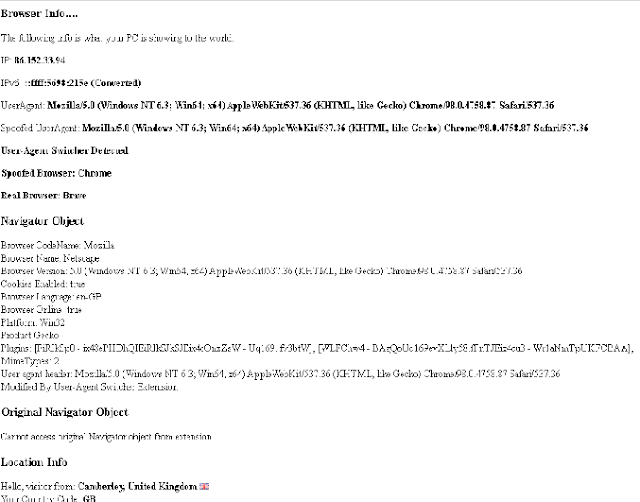


You can see here that although the user-agent strings are exactly the same my code that detects the browser has correctly recognised the real browser as Brave by using the function this article is about and for the spoofed Browser name it shows Chrome, which is the browser Brave tries to mask itself as.

This handy little script is on all my browsers bookmark bars for easy access and I find it very helpful for quickly seeing if a user-agent switcher is enabled and what if any, my browser it is pretending to be, as well as my current GEO-IP location in case I am using a global VPN, TOR, Opera or a proxy.

Let me know what you think of this function tested in Firefox, Chrome, Opera, Edge and of course Brave.

By Strictly-Software


Monday, 17 January 2022

Running JavaScript Before Any Other Scripts On A Page

Injecting A Script At The Top Of Your HTML Page


By Strictly-Software

If you are developing an extension for either Firefox, Opera or Chrome, Brave, Edge, and Chromium, then you might come across the need to be able to inject some code into the top of your HTML page so that it runs before any other code.

When developing extensions for Chromium based browsers such as Chrome, Brave and Edge, you will most likely do this from your content.js file which is one of the main files that holds code to be run at certain stages of a pages lifetime.

As the Chrome Knowledge Base says the property values for the "run_at" property include;

  • document_idle, the preferred setting where scripts are guaranteed to run after the DOM is complete and after the window.onload event has loaded all resources which can include other scripts.
  • document_end, content.js scripts are injected immediately after the DOM is complete, but before subresources like images and frames have loaded. So after the DOM is loaded but before window.onload has finished loading external resources.
  • document_start, ensures scripts are injected after any CSS files are loaded but before any other DOM is constructed or any other script is run.  
  • There is of course the "run_at" property in the manifest.json file, which can be set to "document_start", to enable the codes running before other code does. This is especially useful if you need to change header values before a web page loads so that modified values such as the Referer or User-Agent can be modified. However, there may also be a need for you to set up an object or variable that is inserted into the DOM for code within the HTML page to access.

    For example in a User-Agent switcher where you need to both overwrite the Navigator object in JavaScript and the Request header, you may want to create an object or variable that holds the original REAL navigator object or its user-agent so that any page you may create yourself or offer to your users the ability to see the REAL user-agent, browser, language, and other properties if they wanted to.

    For example, I have my own page that I use to show me the current user-agent and list the navigator properties

    However, if they have been modified by my own user-agent switcher extension I also offer up a variable holding the original REAL user-agent so that it can be shown and compared with the spoofed version to see what has changed. I also have a variable that holds the original navigator object in case I want to look at the properties.

    Therefore my HTML page may want to inspect this object if it exists with some code on the page.

    // check to see if I can access the original Navigator object and the user agent string
    if(typeof(origNavigator) !== 'undefined' && origUserAgent !== null)
    {
    	// get the real Browser name with my Detect Browser function using the original Navigator user-agent
    	let realBrowser = Browser.DetectBrowser(origUserAgent);
    
    	// output on the page in a DIV I have
    	G("#RealBrowser").innerHTML = "<b>Real Browser: " + realBrowser "</b>";
    }

    This code just uses a generic Browser detection function for taking a user-agent and finding the Browser name. It even detects Brave by ruling out other browsers and if it is Chrome at the end I check for the Brave properties or mention of the word in the string, which they used to have but newer versions have removed it. 

    However there is hope in the community that they will create a unique user-agent with the word Brave in as at the moment people are having to do object detection which is the better method, and as Brave tries to hide, there are plenty of query strings and other API calls which can be made to find out whether the result indicates Brave rather than Chrome.

    However, at the moment, I am just using a simple detection on the window.navigator object that if TRUE indicates that it is actually Brave NOT Chrome. 

    A later article shows a longer function I developed with fallbacks in case the objects do not exist anymore as there used to be a brave object on the window e.g window.brave that no longer exists, so did many objects for Chrome such as window.google and window.googletag that no longer exist. However, this article explains all that.

    This is just the one line test you can do, it ensures it is not FireFox with a test for a Mozilla only object window.mozInnerScreenX and then checks that it is a Chromium browser with tests for window.chrome and that it's also webkit with a test for window.webkitStorageInfo before some tests for navigator.brave and navigator.brave.isBrave to ensure it's Brave not Chrome e.g:

    // ensure that a Chrome user-agent is not actually Brave by checking some properties that seem to work to identify the browser at the moment anyway...
    let isBrave = !("mozInnerScreenX" in window) && ("chrome" in window && "webkitStorageInfo" in window && "brave" in navigator && "isBrave" in navigator.brave) ? true : false


    However, this article is more about injecting a script into the HEAD of your HTML so that code on the page can access any properties within it.

    As my extension offers an Original Navigator object and a string holding the original/real user-agent before I overwrite it, then I want this code to be the first piece of JavaScript on the page.

    This doesn't have to be limited to extensions and you may have code you want to inject in the HEAD when the DOMLoads before any other code.

    This is a function I wrote that attempts to place a string holding your JavaScript into a new Script block I create on the fly and then insert before any other SCRIPT in the document.head.

    However, if the page is malformed, or has no defined head area it falls back to just appending the script to the document.documentElement object.

    If you pass false in for the 2nd parameter which tells the function whether or not to remove the script after inserting it then if you view the generated source code for the page you will see the injected script code in the DOM.

    The code looks within the HEAD for another script block and if found it inserts it before the first one using insertBefore() however if there is NO script block in the HEAD then the function will just insert the script into the HEAD anyway using the appendChild() method.

    An example of the function in action with a simple bit of JavaScript that stores the original navigator object and user-agent is below. You might find multiple uses for such code in your own work.

    // store the JavaScript in a string
    var code = 'var origNavigator = window.navigator; var origUserAgent = origNavigator.userAgent;";
    
    // now call my function that will append the script in the head before any other and then remove it if required. For testing you may want to not remove it so you can view it in the generated DOM.
    appendScript(code,true);
    
    // function to append a script first in the DOM in the HEAD, with a true/false parameter that determines whether to remove it after sppending it.
    function appendScript(s,r=true){
    
    	// build script element up
    	var script = document.createElement('script');
    	script.type = 'text/javascript';
    	script.textContent = s;
    	
    	// we want our script to run 1st incase the page contains another script e.g we want our code that stores the orig navigator to run before we overwrite it
    
    	// check page has a head as it might be old badly written HTML
    	if(typeof(document.head) !== 'undefined' && document.head !== null)
    	{	
    		// get a reference to the document.head and also to any first script in the head
    		let head = document.head;
    		let scriptone = document.head.getElementsByTagName('script')[0];
    
    		// if a script exists then insert it before 1st one so we dont have code referencing navigator before we can overwrite it		
    		if(typeof(scriptone) !== 'undefined' && scriptone !== null){	
    			// add our script before the first script
    			head.insertBefore(script, scriptone);
    		// if no script exists then we insert it at the end of the head
    		}else{
    			// no script so just append to the HEAD object
    			document.head.appendChild(script);
    		}
    	// no HEAD so fall back to appending the code to the document.documentElement
    	}else{
    		// fallback for old HTML just append at end of document and hope no navigator reference is made before this runs
    		document.documentElement.appendChild(script);
    	}
    	// do we remove the script from the DOM
    	if(r){
    		// if so remove the script from the DOM
    		script.remove();
    	}
    }


    I find this function very useful for both writing extensions and also when I need to inject code on the fly and ensure it runs before any other scripts by using a onDOMLoad method.

    Let me know of any uses you find for it.

    Useful Resource: Content Scripts for Chrome Extension Development. 


    By Strictly-Software

    Wednesday, 5 October 2016

    A Karmic guide for Scraping without being caught

    Quick Regular Expression to clean off any tracking codes on URLS

    I have to deal with Scrapers all day long in my day job and I ban them in a multitude of ways from using firewalls, .htaccess rules, my own personal logger system that checks for the duration between page loads, behaviour, and many other techniques.

    However I also have to scrape HTML content sometimes for various reasons, such as to find a piece of content related to somebody on another website linked to my own. So I know both methods to use to detect scrapers and stop them.

    This is a guide to various methods that scrapers use to prevent being caught and have their IP address added to a blacklist within minutes of starting. Knowing the methods people use to scrape sites will help you when you have to defend your own from scrapers so it's good to know both attack and defense.

    Sometimes it is just too easy to spot a script kiddy who has just discovered CURL and thinks it's a good idea to test it out on your site by crawling every single page and link available.

    Usually this is because they have downloaded a script from the net, sometimes a very old one, and not bothered to change any of the parameters. Therefore when you see a user-agent in you logfile that is hammering you that just has the user-agent of "CURL" you can block it and know you will be blocking many other script kiddies as well.

    I believe that when you are scraping HTML content from a site it always wise to follow some golden rules based on Karma. It is not nice to have your own site hacked or taken down due to a BOT gone wild therefore you shouldn't wish this on other people either. 

    Behave when you are doing your own scraping and hopefully you won't find your own sites content appearing on a Chinese rip off under a different URL anytime soon.


    1. Don't overload the server your are scraping. 

    This only lets the site admin know they are being scraped as your IP / Useragent will appear in their log files so regularly that you might get confused for trying a DOS attack. You could find yourself added to a block list ASAP if you hammer the site you are scraping.

    The best way to get round this is to put a time gap in-between each request you make. If possible follow the sites Robots.txt file if they have one and use any Crawl-Delay parameter they may have specified. This will make you look much more legitimate as you are obeying their rules.

    If they don't have a Crawl-Delay value then randomise a wait time in-between HTTP requests, with at least a few seconds wait as the minimum. If you don't hammer their server and slow it down you won't draw attention to yourself.

    Also if possible try to always obey the sites Robot.txt file as if you do you will find yourself on the right side of the Karmic law. There are many tricks people use such as dynamic Robots.txt files, and fake URL's placed within them, that are used to trick scrapers who break the rules by following DISALLOWED locations into honeypots, never-ending link mazes or just instant blocks.

    An example of a simple C# Robots.txt parser I wrote many years ago that can easily be edited to obtain the Crawl-Delay parameter can be found here: Parsing the Robots.txt file with C-Sharp.


    2. Change your user-agent in-between calls. 

    Many offices share the same IP across their network due to the outbound gateway server they use, also many ISP's use the same IP address for multiple home users e.g DHCP. Therefore there is no easy way until IPv6 is 100% rolled out to guarantee that by banning a user by their IP address alone you will get your target.

    Changing your user-agent in-between calls and using a number of random and current user-agents will make this even harder to detect.

    Personally I block all access to my sites that use a list of BOTS I know are bad or where it is obvious the person has not edited the user-agent (CURL, Snoopy, WGet etc), plus IE 5, 5.5, 6 (all the way up to 10 if you want).

    I have found one of the most common user-agents used by scrapers is IE 6. Whether this is because the person using the script has downloaded an old tool with this as the default user-agent and not bothered to change it or whether it is due to the high number of Intranet sites that were built in IE6 (and use VBScript as their client side language) I don't know.

    I just know that by banning IE 6 and below you can stop a LOT of traffic. Therefore never use old IE browser UA's and always change the default UA from CURL to something else such as Chromes latest user-agent.

    Using random numbers, dashes, very short user-agents or defaults is a way to get yourself caught out very quickly.


    3. Use proxies if you can. 

    There are basically two types of proxy.

    The proxy where the owner of the computer knows it is being used as a proxy server, either generously to allow people in foreign countries such as China or Iran to access outside content or for malicious reasons to capture the requests and details for hacking purposes.

    Many legitimate online proxy services such as "Web Proxies" only allow GET requests, float adverts in front of you and prevent you from loading up certain material such as videos, JavaScript loaded content or other media.

    A decent proxy is one where you obtain the IP address and port number and then set them up in your browser or BOT to route traffic through. You can find many free lists of proxies and their port numbers online although as they are free you will often find speed is an issue as many people are trying to use them at the same time. A good site to use to obtain proxies by country is http://nntime.com.

    Common proxy port numbers are 8000, 8008, 8888, 8080, 3128. When using P2P tools such as uTorrent to download movies it is always good to disguise your traffic as HTTP traffic rather than using the default setting of a random port on each request. It makes it harder but obviously not impossible for snoopers to see you are downloading bit torrents and other content. You can find a list of ports and their common uses here.

    The other form of proxy are BOTNET's or computers where PORTS have been left open and people have reversed engineered it so that they can use the computer/server as a proxy without the persons knowledge.

    I have also found that many people who try hacking or spamming my own sites are also using insecure servers. A port scan on these people often reveals that their own server can be used as a proxy themselves. If they are going to hammer me - then sod them I say as I watch US TV live on their server.


    4. Use a rented VPS

    If you are only required to scrape for a day or two then you can hire a VPS and set it up so that you have a safe non-blacklisted IP address to crawl from. With services like AmazonAWS and other rent by the minute servers it is easy to move your BOT from server to server if you need to do some heavy duty crawling.

    However on the flipside I often find myself banning the AmazonAWS IP range (which you can obtain here) as I know it is so often used by scrapers and social media BOTS (bandwidth wasters).


    5. Confuse the server by adding extra headers

    There are many headers that can tell a server whether you are coming through a proxy such as X-FORWARDED-FOR, and there is standard code used by developers to work backwards to obtain the correct original IP address (REMOTE_ADDR) which can allow them to locate you through a Geo-IP lookup.

    However not so long ago, and many sites still may use this code, it was very easy to trick sites in one country into believing you were from that country by modifying the X-FORWARDED-FOR header and supplying an IP from the country of your choice.

    I remember it was very simple to watch Comedy Central and other US TV shown online just by simply using a FireFox Modify Headers plugin and entering in a US IP address for the X-FORWARDED-FOR header.

    Due to the code they were using, they obviously thought that the presence of the header indicated that a proxy had been used and that the original country of origin was the spoofed IP address in this modified header rather than the value in REMOTE_ADDR header

    Whilst this code is not so common anymore it can still be a good idea to "confuse" servers by supplying multiple IP addresses in headers that can be modified to make it look like a more legitimate request.

    As the actual REMOTE_ADDR header is set by the outbound server you cannot easily change it. However you can supply a comma delimited list of IP's from various locations in headers such as X-FORWARDED-FOR, HTTP_X_FORWARDED, HTTP_VIA and the many others that proxies, gateways, and different servers use when passing HTTP requests along the way.

    Plus you never know, if you are trying to obtain content that is blocked from your country of origin then this old technique may still work. It all depends on the code they use to identify the country of an HTTP requests origin.


    6. Follow unconventional redirect methods.

    Remember there are many levels of being able to block a scrape so making it look like a real request is the ideal way of getting your content. Some sites will use intermediary pages that have a META Refresh of "0" that then redirect to the real page or use JavaScript to do the redirect such as:
    
    <body onload="window.location.href='http://blah.com'">
    

    or
    
    <script>
    function redirect(){
       document.location.href='http://blah.com';
    }
    setTimeout(redirect,50);
    </script> 
    

    Therefore you want a good super scraper tool that can handle this kind of redirect so you don't just return adverts and blank pages. Practice those regular expressions!


    7. Act human.

    By only making one GET request to the main page and not to any of the images, CSS or JavaScript files that the page loads in you make yourself look like a BOT.

    If you look through a log file it is easy to spot Crawlers and BOTs because they don't obtain these extra files and as a log file is mainly sequential you can easily spot the requests made by one IP or User-Agent just by scanning down the file and noticing all the single GET requests from that IP to different URLS. 

    If you really want to mask yourself as human then use a regular expression or HTML parser to get all the related content as well.

    Look for any URLS within SRC and HREF attributes as well as URLS contained within JavaScript that are loaded up with AJAX. It may slow your own code down plus use up more of your own bandwidth as well as the server you are scraping but it will disguise you much better and make it harder for anyone looking at a log file to distinguish you from a BOT with a simple search.


    8. Remove tracking codes from your URL's.

    This is so that when the SEO "guru" looks at their stats they don't confuse their tiny little minds by not being able to work out why it says 10 referrals from Twitter but only 8 had JavaScript enabled or had the tracking code they were using for a feed. This makes it look like a direct, natural request to the page rather than a redirect from an RSS or XML feed.

    Here is an example of a regular expression that removes anything after the query-string including the question mark.

    The example uses PHP but the expression itself can be used in any language.

    
    $url = "http://www.somesite.com/myrewrittenpage?utm_source=rss&utm_medium=rss&utm_campaign=mycampaign";
    
    
    $url = preg_replace("@(^.+)(\?.+$)@","$1",$url);


    There are many more rules to scraping without being caught but the main aspect to remember is Karma. 

    What goes around comes around, therefore if you scrape a site heavily and hammer it so bad that it costs the user so much bandwidth and money that they cannot afford it, do not be surprised if someone comes and does the same to you at some point!

    Wednesday, 23 October 2013

    4 simple rules robots won't follow

    4 simple rules robots won't follow

    Job Rapists and Content Scrapers - how to spot and stop them!

    I work with many sites from small blogs to large sites that receive millions of page loads a day. I have to spend a lot of my time checking my traffic log and logger database to investigate hack attempts, heavy hitting bots and content scrappers that take content without asking (on my recruitment sites and jobboards I call this Job Raping and the BOT that does it a Job Rapist).

    I banned a large number of these "job rapists" the other week and then had to deal with a number of customers ringing up to ask why we had blocked them. The way I see it (and that really is the only way as it's my responsibility to keep the system free of viruses and hacks) if you are a bot and want to crawl my site you have to do the following steps.

    These steps are not uncommon and many sites implement them to reduce bandwidth wasted on bad BOTS as well as protect their sites from spammers and hackers.

    4 Rules For BOTS to follow


    1. Look at the Robots.txt file and follow the rules

    If you don't even bother looking at this file (and I know because I log those that do) then you have broken the most basic rule that all BOTS should follow.

    If you can't follow even the most basic rule then you will be given a ban or 403 ASAP.

    To see how easy it is to make a BOT that can read and parse a Robots.txt file please read this article (and this is some very basic code I knocked up in an hour or so)

    How to write code to parse a Robots.txt file (including the sitemap directive).


    2. Identify yourself correctly

    Whilst it may not be set in stone, there is a "standard" for BOTS to identify themselves correctly in their user-agents and all proper SERPS and Crawlers will supply a correct user-agent.

    If you look at some common ones such as Google or BING or a Twitter BOT we can see a common theme.

    Mozilla/5.0 (compatible; Googlebot/2.1; +http://www.google.com/bot.html)
    Mozilla/5.0 (compatible;bingbot/2.0;+http://www.bing.com/bingbot.htm)
    Mozilla/5.0 (compatible; TweetedTimes Bot/1.0; +http://tweetedtimes.com)

    They all:
    -Provide information on the browser compatibility e.g Mozilla/5.0.
    -Provide their name e.g Googlebot, bingbot, TweetedTimes.
    -Provide their version e.g 2.1, 2.0, 1.0
    -Provide a URL where we can find out information about the BOT and what it does e.g http://www.google.com/bot.htmlhttp://www.bing.com/bingbot.htm and http://tweetedtimes.com

    On the systems I control and on many others that use common intrusion detection systems at firewalls and system level (even WordPress plugins). Having a blank user-agent or a short one that doesn't contain a link or email address is enough to get a 403 or ban.

    At the very least a BOT should provide some way to let the site owner find out who owns the BOT and what the BOT does.

    Having a user-agent of "C4BOT" or "Oodlebot" is just not good enough.

    If you are a new crawler identify yourself so that I can search for your URL and see whether I should ban you or not. If you don't identify yourself I will ban you!


    3. Set up a Reverse DNS Entry

    I am now using the "standard" way of validating crawlers against the IP address they crawl from.

    This involves doing a reverse DNS lookup with the IP used by the bot.

    If you haven't got this setup then tough luck. If you have then I will do a forward DNS to make sure the IP is registered with the host name.

    I think most big crawlers are starting to come on board with this way of doing things now. Plus it is a great way to identify correctly that GoogleBot is really GoogleBot, especially when the use of user-agent switcher tools are so common nowadays.

    I also have a lookup table of IP/user-agents for the big crawlers I allow. However if GoogleBot or BING start using new IP addresses that I don't know about the only way I can correctly identify them (especially after experiencing GoogleBOT hacking my site) is by doing this 2 step DNS verification routine.


    4. Job Raping / Scraping is not allowed under any circumstances. 

    If you are crawling my system then you must have permission from each site owner as well as me to do this.

    I have had bots hit tiny weeny itsy bitsy jobboards with only 30 jobs have up to 400,000 page loads a day because of scrapers, email harvesters and bad bots.

    This is bandwidth you should not be taking up and if you are a proper job aggregator like Indeed, JobsUK, GoogleBase then you should accept XML feeds of the jobs from the sites who want their jobs to appear on your site.

    Having permission from the clients (recruiters/employers) on the site is not good enough as they do not own the content the site owner does. From what I have seen the only job aggregators who crawl rather than accept feeds are those who can't for whatever reason get the jobs the correct way.

    I have put automated traffic analysis reports into my systems that let me know at regular intervals which bots are visiting me, which visitors are heavy hitting and which are spoofing, hacking, raping and other forms of content pillaging.

    It really is like an arms race from the cold war and I am banning bots every day of the week for breaking these 4 simple to follow rules.

    If you are legitimate bot then its not too hard to come up with a user-agent that identifies yourself correctly, set up a reverse DNS entry, follow the robots.txt rules and don't visit my site everyday crawling every single page!

    Wednesday, 8 July 2009

    Another article about bots and crawlers

    Good Guys versus the Bad Guys

    As you will know if you have read my previous articles about badly behaved robots I have to spend a lot of time dealing with crawlers who access one of the 200+ jobboards I look after. Crawlers break down into 2 varieties, the first are the indexers such as Googlebot, YSlurp, Ask etc. They provide a service to the site owner by indexing their content and displaying it in search engines to drive traffic to the site. Although these are legitimate bots they
    can still cause issues (see this article about over-crawling). The second class are those bots that don't benefit the site owner and in a large majority of cases try to harm the site either by hacking or spamming or content scraping (or job raping as we call it).

    Now it maybe that the site owner wishes that any Tom, Dick and Harry can come along with a scrapper and take all their content but seeing that content is the main asset of a website its a bit like starting a shop and leaving the doors open all night with no-one manning the till. The problem is that most web content is publicly accessible and its very hard to prevent someone who is determined to scrape your content and at the same time have good SEO. For instance you could deliver all your content through Javascript or Flash but then the indexers like Googlebot won't be able to access your content either. Therefore to prevent overloaded servers, stolen bandwidth and content it becomes a complex game involving a lot more than having a blacklist of IP addresses and user-agents. Due to IP and Agent spoofing this is very unreliable so a variety of methods can be utilised by those wishing to reduce the amount of "Bad Traffic" including real time checks to identify users that are hammering the site, white lists and blacklists, bot traps, DNS checks and much more.

    One of the problems I have found is that even bot traffic that is legitimate in the eyes of the site owner doesn't comply with even the most basic rules of crawler etiquette such as a proper user-agent string, parsing DNS validation or even following the Robots.txt file rules. In fact when we spoke to the technical team running one of these job-rapists/aggregators they informed us that they didn't have the technical capabilities to parse a Robots.txt file. Now I think this is plainly ridiculous as if you have the technical capability to crawl hundreds of thousands of pages a day all with different HTML and correctly parse this content to extract the job details which is then uploaded to your own server for display it shouldn't be too difficult to add a few lines in to parse the Robots.txt file. I am 99% positive this was just an excuse to hide the fact they knew if they did parse my Robots.txt file they would find they were banned from all my sites. Obviously I had banned them with other methods but just to show how easy it is to write code to parse a robots.txt file and for that matter a crawler I have added some example code to my technical site. How to parse a Robots.txt file with c#.

    This is one of the primary reasons there is so much bot traffic on the web today. Its just too damn easy to either download and run a bot from the web or write your own. I'm not saying all crawlers and bots have nefarious reasons behind them but I reckon 80%+ of all Internet traffic is probably from crawlers and bots nowadays with the other 20% being porn, music and film downloads and social networking traffic. It would be interesting to get
    exact figures for Internet traffic breakdown. I know from my own sites logging that on average 60-70% of traffic is crawler and I am guessing that doesn't include traffic from spoofed agents that didn't get identified as such.

    Monday, 1 December 2008

    Job Rapists and other badly behaved bots

    How bad does a bot have to be before banning it?

    I had to ban a particular naughty crawler the other day that belonged to one of the many job aggregators that spring up ever so regularly. This particular bot belonged to a site called jobrapido which one of my customers calls "that job rapist" for the very good reason that it seems to think that any job posted on a jobboard is theirs to take without asking either the job poster or site owner that its posted on. Wheres the good aggregators such as JobsUK require that the job poster or jobboard submits a regular XML feed of their jobs rapido just seems to endlessly crawl and crawl every site they know about and just take whatever they find. In fact on their home page they state the following:

    Do you know a job site that does not appear in Jobrapido? Write to us!

    Isn't that nice? Anyone can help them thieve, rape and pillage another sites jobs. Maybe there is some bonus point system for regular informers. Times are hard as we all know and people have to get their money where they can! However it shouldn't be from taking other peoples content unrequested.

    This particular bot crawls so much it actually made one of our tiniest jobboards appear in our top 5 rankings one month purely from its crawling alone. The site had less than 50 jobs but a lot of categories which meant that this bot decided to visit each day and crawl every single search combination which meant 50,000 page loads a day!

    Although this rapido site did link back to the original site that posted the job to allow the jobseeker to apply to the job the amount of referrals was tiny (150 a day across all 100+ of our sites) compared to the huge amount of bandwidth it was stealing from us (16-20% of all traffic). It was regularly ranked above Googlebot, MSN and Yahoo as the biggest crawler in my daily server reports as well as being the biggest hitter (page requests / time).

    So I tried banning it using robots.txt directives as any legal well behaved bot should pay attention to that file however 2 weeks after adding all 3 of their agents to the file they were still paying us visits each day and no bot should cache the file for that length of time so I banned it using the htaccess file.

    So if you work in the jobboard business and don't want a particular heavy bandwidth thief, content scrapper and robots.txt file ignorer hitting your sites every day then do yourself a favour and ban these agents and IP addresses:

    Mozilla/5.0 (compatible; Jobrapido/1.1; +http://www.jobrapido.com)

    "Mozilla/5.0 (compatible; Jobrapido/1.1; +http://www.jobrapido.com)"

    Mozilla/5.0 (JobRapido WebPump)

    85.214.130.145
    85.214.124.254
    85.214.20.207
    85.214.66.152

    If you want a good UK Job Aggregator that doesn't pinch sites jobs without asking first then use JobsUK. Its simple to use and has thousands of new jobs from hundreds of jobboards added every day.

    Monday, 24 November 2008

    Trying to detect spoofed user-agents

    User Agent Spoofing

    A lot of traffic comes from browsers either masking their real identity by using a different user agent than the real one associated with the browser or a random string which relates to no known browser. The purpose of doing this is many fold from malicious users trying to mask their real identity to get round code that may ban on user-agents or get round client side code that may be blocking certain browsers from using certain functionality which is all a good reason for using object detection rather than browser sniffing when deciding which code branch to run.

    However as you will probably know if you have tried doing anything apart from simple JavaScript coding there are still times when you need to know the browser because object detection just isn't feasible and trying to use object detection to work out the browser is just as bad in my opinion as using browser sniffing to work out the object.

    Therefore when someone is using an agent switcher to mask the browsers agent and you come across one of these moments then it may cause you to run code that will raise errors. There is no foolproof way to spot whether an agent is spoofed but one of the things you can do if you do require this information is compare the agent with known objects that should be supported by that browser and if they don't match then you can confirm the spoof.

    This form of spoof detection will only work if its only the user agent string that has been changed but an example of some of the checks you can do include for agents that say they are Opera make sure it supports window.opera as well as both event models document.addEventListener && document.attachEvent as far as I know its the only browser that does support both. For IE you shouldn't check document.all by itself as you will actually find Firefox will return true for this but you can check for window.ActiveXObject the non existence of addEventListener and use conditional comments to test for JScript. Firefox should obviously not support JScript as it uses Javascript.

    Those are just a few checks you could do and you are basically using object detection as well as agent sniffing together to make sure they match. They may not tell you the real browser being masked but they can be used to tell you what its not. 

    The idea of this is to make sure that in those cases where you have to branch on browser rather than object (see this previous article) that you make the right choice and don't cause errors. Obviously you may decide that if the user is going to spoof the agent then leave them to suffer any errors that may come their way.

    If you do require a lightweight browser detector that checks for user agent spoofing amongst the main browsers as well as support for advanced CSS, Flash and other properties then see this article.